Part 8: SSD1306 Title Animation
Turn a still framebuffer into stars that assemble into WITH / RASPBERRY PI, hold the title, then scatter. This standalone C++17 sample separates drawing, frame pacing and I2C output; it does not start a background screensaver.
Sample code on GitHub
Sample and README · C++ source · CMake build instructions
The CMake target is oled_title. The downloadable standalone file matches the repository's main.cpp; no external font or course-specific C++ header is required.
Before you start
Complete your first SSD1306 display. For actual output, that still image must already be visibly correct on your documented 3.3 V-compatible, four-pin, 128×64 SSD1306 I2C module with an internal charge pump. This is not an SH1106, SPI or 128×32 example. Use the previous lesson's power, pin-numbering and I2C-permission checks; do not rewire a powered board.
Run the commands on the Pi, or build the preview on a Linux computer. You need basic C++17, Git, CMake 3.28+, Make and Python 3 for the tests. The rendering and software tests need no display, root access or additional libraries.
Outcome: explain how a frame changes over time, preview the held title without opening I2C, then deliberately run a finite animation that sends Display Off before normal exit.
The original effect and this recreation
The original temporary animation source was not retained. This new implementation follows its stars → forming title → held title idea, with a compact built-in font and deterministic particles. It is not a recovered original program, a pixel-exact reproduction, or a claim that the footage measures this sample's speed.
1. Build in a fresh practice directory
First inspect your installed tools:
If a requirement is missing, prepare the development environment first. Do not build with sudo.
The following commands create a new temporary directory and download the examples:
The category currently has 42 software checks, including nine animation checks. They cover deterministic previews, argument limits and a link-time fake I2C bus. No test opens a real GPIO, PWM or I2C device. A simulated Display Off check is not evidence of visible pixels or working wiring.
Keep this terminal in the category directory. /tmp is temporary storage; keep your own changed source somewhere durable if needed.
2. Render without opening the bus
Expected output:
/unverified-device is deliberately not a real device. Here 0x3c is an argument-format example, not discovery of your module's address. Both the dry run and the preview avoid opening the bus.
Export the held-title frame into the new practice directory:
Open title.pbm in a PBM-capable image viewer, or copy it to your client computer. This is a 128×64 binary PBM P4 file. Black PBM pixels represent lit OLED pixels; the software preview below inverts those colours for a display-like view.
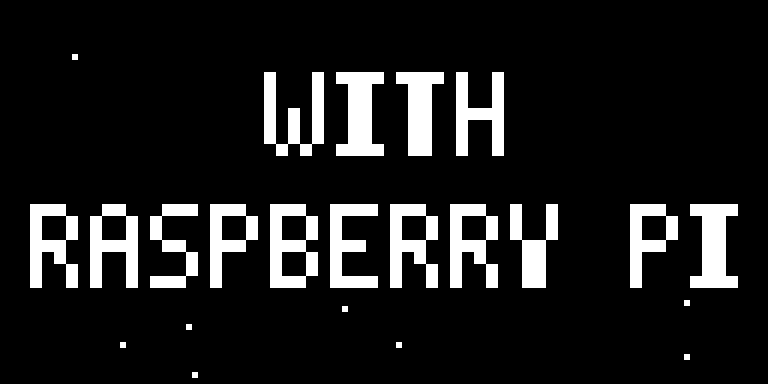
The source uses the same page-oriented framebuffer as the previous lesson:
The PBM exporter converts those vertical page bits into horizontal, most-significant-bit-first rows. Dumping the 1024 framebuffer bytes straight into a PBM would not produce this image.
3. Understand the 128-frame scene
title_pixels() draws two lines into a temporary framebuffer, then collects the lit coordinates as particle destinations. Each particle gets a reproducible starting position from an integer hash of its index. No wall clock or random seed changes the rendering.
| Frame within the cycle | Scene |
|---|---|
| 0–15 | Moving stars |
| 16–47 | Particles move toward their title positions |
| 48–95 | Title stays readable; stars move outside its rows |
| 96–111 | Particles move away from the title |
| 112–127 | Stars only |
The next frame starts the same scene again if you request more than 128 frames. The normal run sends just one cycle. The target 16 frames/second makes that an intended eight-second sequence, not proof that every bus and OS can deliver it in eight seconds.
The interpolation uses integer smoothstep: for t from 0 to 32, t*t*(96-2*t) goes from 0 to 32*32*32. Applying that fraction to a particle's start-to-target offset slows its approach near the final position. pixel() clips coordinates to the 128×64 buffer.
4. Run one cycle on the verified OLED
Use the actual bus and 7-bit address established in the previous lesson. The example below assumes /dev/i2c-1 and 0x3c; 0x3d is also accepted when that is your verified address. An I2C acknowledgement alone does not identify a controller.
Close other programs that write to the same OLED. If fuser is installed, fuser /dev/i2c-1 is a read-only check for visible bus users, not a guarantee that every possible writer has been identified. Do not kill an unfamiliar process or use I2C_SLAVE_FORCE.
Only after the still-frame, module, permission and ownership checks, enable output:
For a completed 128-frame run:
The display should show the scene and then turn off. Look at the physical panel: successful writes do not prove the pixels are correct. This sample resets orientation, addressing and contrast for its own output; it does not preserve a previous program's panel state.
Press Ctrl+C to request an earlier stop. The handler sets a flag; the normal loop sends Display Off and closes I2C. A signal exit returns status 130. The number of frames sent before the signal varies.
For a deliberately shorter run:
That stops during the held title; it is not a full cycle. --frames accepts 1–600, --fps accepts 1–30, and requested duration must be no longer than 30 seconds. A steady-clock deadline is checked between frames too. It cannot preempt a kernel I2C call that is already blocked.
To send Display Off again deliberately:
Normal completion sends Display Off; exceptions try it as best-effort cleanup. A disconnected bus, power loss or SIGKILL can prevent cleanup. Do not leave a static, bright title running as a permanent installation and assume moving stars prevent OLED wear.
5. Separate drawing, transfer and pacing
- Drawing:
render()returns exactly 1024 bytes, without opening I2C or sleeping. That makes previews and fixture comparisons repeatable. - Transfer:
Bus::initialize()configures the panel once.show()resets its column/page window for each frame and sends chunks with the0x40data control byte. Short writes stop the run rather than silently accepting a partial frame. - Pacing:
steady_clockand short sleeps avoid a busy loop. If a transfer is slow, the next frame is scheduled from the current time instead of sending a burst of overdue frames. - Shutdown: the foreground loop owns the bus. There is no systemd service, reboot requirement, bus-speed edit or permanent background animation.
The sample requests low contrast (0x30) but does not measure brightness, power consumption or OLED lifetime. Full-frame transfers are not synchronized to panel scanout and are not claimed to be tear-free.
Full standalone C++ source
Complete file: app/oled-title/main.cpp. Download the same file.
1 2 3 4 5 6 7 8 9 10 11 12 13 14 15 16 17 18 19 20 21 22 23 24 25 26 27 28 29 30 31 32 33 34 35 36 37 38 39 40 41 42 43 44 45 46 47 48 49 50 51 52 53 54 55 56 57 58 59 60 61 62 63 64 65 66 67 68 69 70 71 72 73 74 75 76 77 78 79 80 81 82 83 84 85 86 87 88 89 90 91 92 93 94 95 96 97 98 99 100 101 102 103 104 105 106 107 108 109 110 111 112 113 114 115 116 117 118 119 120 121 122 123 124 125 126 127 128 129 130 131 132 133 134 135 136 137 138 139 140 141 142 143 144 145 146 147 148 149 150 151 152 153 154 155 156 157 158 159 160 161 162 163 164 165 166 167 168 169 170 171 172 173 174 175 176 177 178 179 180 181 182 183 184 185 186 187 188 189 190 191 192 193 194 195 196 197 198 199 200 201 202 203 204 205 206 207 208 209 210 211 212 213 214 215 216 217 218 219 220 221 222 223 224 225 226 227 228 229 230 231 232 233 234 235 236 237 238 239 240 241 242 243 244 245 246 247 248 249 250 251 252 253 254 255 256 257 258 259 260 261 262 263 264 265 266 267 268 269 270 271 272 273 274 275 276 277 278 279 280 281 282 283 284 285 286 287 288 289 290 291 292 293 294 295 296 297 298 299 300 301 302 303 304 305 306 307 308 309 310 311 312 313 314 315 316 317 318 319 320 321 322 323 324 325 326 327 328 329 330 331 332 333 334 335 336 337 338 339 340 341 342 343 344 345 346 347 348 349 350 351 352 353 354 355 356 357 358 359 360 361 362 363 364 365 366 367 368 369 370 371 372 373 374 375 376 377 378 379 380 381 382 383 384 385 386 387 388 389 390 391 392 393 394 395 396 397 398 399 400 401 402 403 404 405 406 407 408 409 410 411 412 | |
An alternative direct build from the same checkout is:
This compiles only the standalone program; it does not replace the CTest suite.
Troubleshooting and verification scope
| Result | Next check |
|---|---|
Open I2C error |
Device path, enabled interface and the login's permissions; do not make root the default workaround |
| Address-selection or write error | Correct bus, module, address and competing driver/writer; power down before checking wiring |
| Writes succeed but the display is blank or distorted | First reproduce the previous lesson's still image; verify the actual controller and dimensions |
| Fewer frames or slower motion | Inspect the transfer path and requested pacing; do not treat target_fps as a measurement or change bus speed blindly |
| Panel stays lit after interruption | Use the explicit --off command if I2C works; forced termination and electrical faults cannot guarantee cleanup |
On 25 October 2026, the host (GCC 15.2) and Pi 4B (AArch64, GCC 14.2, CMake 3.31.6, Debian 13-based Raspberry Pi OS, kernel 6.18.50+rpt-rpi-v8) passed all 42 software checks in Debug and Release. The Pi sent all 128 frames to the already connected /dev/i2c-1, address 0x3c, then sent Display Off. A separate SIGINT run also exited after sending Display Off. No package, bus-speed or service configuration was changed.
Those are software/transfer results, not a new camera recording, pixel readback, achieved-frame-rate or power measurement. The video above remains the earlier physical demonstration. The fake-bus tests additionally cover payload packing, I/O errors, short writes and address-selection failure without touching hardware.
Practice before the next lesson
Without --show, export frames 0, 32, 64 and 112. Explain why only frame 64 contains the held title. Then plan a 64-frame run at 16 fps: how much of the eight-second scene would it request?
Hint and expected result
Frames 0 and 112 are stars-only phases; frame 32 is assembling. Frame 64 is inside 48–95, the held-title range. Sixty-four frames at a target of 16 fps request four seconds, ending partway through the held title. File rendering does not prove a physical refresh rate.
Check your understanding and continue
Why should render() avoid I2C and sleeps? Why is 0x40 not the device address? What can prevent Display Off even with a signal handler? Why is the original video not a benchmark of this new program?
Return to C++ Hardware Programming, revisit the first still display, or learn how to send application data in the Network course. A live temperature/network status display is a further integration project, not a feature of this title sample.
References: Linux I2C device interface, SSD1306 datasheet, and the original MIT-licensed driver.
Your C++ hardware learning
Mark completion yourself. Reading a page or passing a dry run does not verify the physical circuit.
About your saved progress
Saved only in this browser, without an account or cross-device sync. Clearing browser data removes it; private browsing may not keep it. This feature does not send progress to a server.