Builder Pattern
Overview
Builder is a creational design pattern that lets you construct complex objects step by step. The pattern allows you to produce different types and representations of an object using the same construction code.
Intent
The Builder pattern separates the construction of a complex object from its representation, allowing the same construction process to create different representations. It's particularly useful when you need to create an object with many optional components or configurations.
Problem
Imagine a complex object that requires laborious, step-by-step initialization of many fields and nested objects. Such initialization code is usually buried inside a monstrous constructor with lots of parameters. Or even worse: scattered all over the client code.
For example, let's think about how to create a House object. To build a simple house, you need to construct four walls and a floor, install a door, fit a pair of windows, and build a roof. But what if you want a bigger, brighter house, with a backyard and other goodies (like a heating system, plumbing, and electrical wiring)?
The simplest solution is to extend the base House class and create a set of subclasses to cover all combinations of the parameters. But eventually you'll end up with a considerable number of subclasses. Any new parameter, such as the porch style, will require growing this hierarchy even more.
There's another approach that doesn't involve breeding subclasses. You can create a giant constructor right in the base House class with all possible parameters that control the house object. While this approach indeed eliminates the need for subclasses, it creates another problem: a constructor with lots of parameters is not always convenient.
Solution
The Builder pattern suggests that you extract the object construction code out of its own class and move it to separate objects called builders.
The pattern organizes object construction into a set of steps (buildWalls, buildDoor, etc.). To create an object, you execute a series of these steps on a builder object. The important part is that you don't need to call all of the steps. You can call only those steps that are necessary for producing a particular configuration of an object.
Some of the construction steps might require different implementation when you need to build various representations of the product. For example, walls of a cabin may be built of wood, but the castle walls must be built with stone.
In this case, you can create several different builder classes that implement the same set of building steps, but in a different manner. Then you can use these builders in the construction process (i.e., an ordered set of calls to the building steps) to produce different kinds of objects.
Structure
UML Diagram
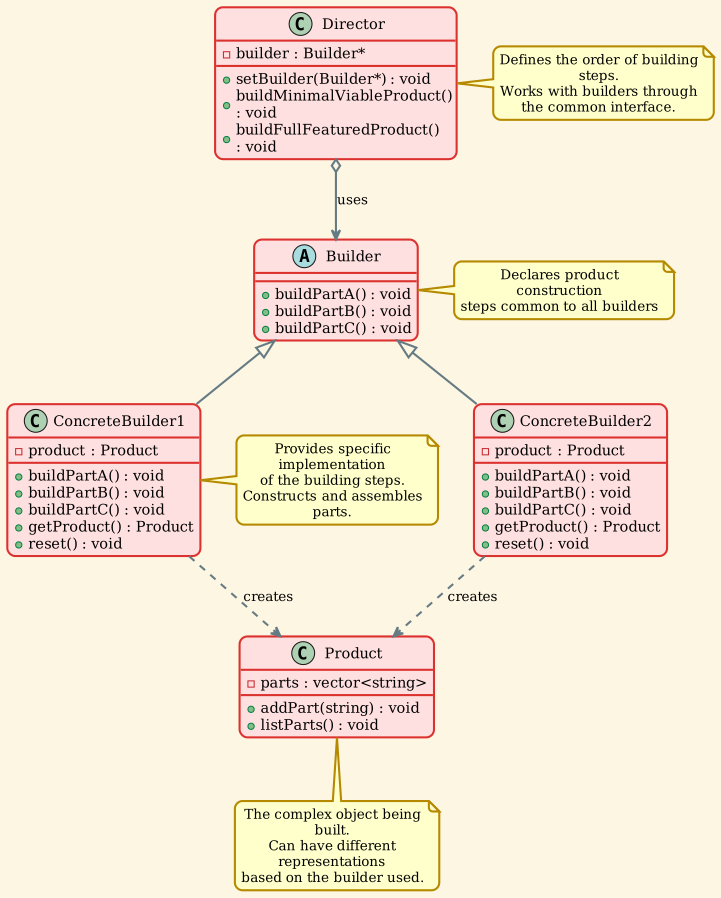
Participants
-
Builder (Builder)
- Specifies an abstract interface for creating parts of a Product object
- Declares product construction steps common to all types of builders
-
ConcreteBuilder (ConcreteBuilder1, ConcreteBuilder2)
- Constructs and assembles parts of the product by implementing the Builder interface
- Defines and keeps track of the representation it creates
- Provides an interface for retrieving the product
-
Director (Director)
- Constructs an object using the Builder interface
- Defines the order in which to call construction steps
- Optional component - client can control builders directly
-
Product (Product)
- Represents the complex object under construction
- Includes classes that define the constituent parts
- Different builders may produce entirely different products
Implementation
Product Class
The Product represents the complex object being built. It contains multiple parts that are assembled step by step.
| // Product.h
#ifndef PRODUCT_H
#define PRODUCT_H
#include <string>
#include <vector>
#include <iostream>
/**
* @brief The Product class represents a complex object being built.
*
* It makes sense to use the Builder pattern only when your products are quite
* complex and require extensive configuration. The product can be composed of
* multiple parts that need to be constructed step by step.
*/
class Product {
private:
std::vector<std::string> parts_;
public:
/**
* @brief Add a part to the product
*/
void addPart(const std::string& part) {
parts_.push_back(part);
}
/**
* @brief List all parts of the product
*/
void listParts() const {
std::cout << "Product parts: ";
for (size_t i = 0; i < parts_.size(); i++) {
if (parts_[i] == parts_.back()) {
std::cout << parts_[i];
} else {
std::cout << parts_[i] << ", ";
}
}
std::cout << "\n\n";
}
};
#endif // PRODUCT_H
|
Builder Interface
The Builder interface declares product construction steps that are common to all types of builders.
| // Builder.h
#ifndef BUILDER_H
#define BUILDER_H
#include "Product.h"
#include <memory>
/**
* @brief The Builder interface specifies methods for creating the different parts
* of the Product objects.
*
* The Builder interface declares product construction steps that are common to
* all types of builders. Concrete builders implement these steps and may add
* their own specific steps.
*/
class Builder {
public:
virtual ~Builder() = default;
/**
* @brief Build part A of the product
*/
virtual void buildPartA() = 0;
/**
* @brief Build part B of the product
*/
virtual void buildPartB() = 0;
/**
* @brief Build part C of the product
*/
virtual void buildPartC() = 0;
};
/**
* @brief The ConcreteBuilder classes follow the Builder interface and provide
* specific implementations of the building steps.
*
* Your program may have several variations of Builders, implemented differently.
* Concrete Builders construct and assemble parts of the product.
*/
class ConcreteBuilder1 : public Builder {
private:
std::unique_ptr<Product> product_;
public:
/**
* @brief A fresh builder instance should contain a blank product object,
* which is used in further assembly.
*/
ConcreteBuilder1() {
this->reset();
}
/**
* @brief Reset the builder to create a new product
*/
void reset() {
this->product_ = std::make_unique<Product>();
}
/**
* @brief All production steps work with the same product instance.
*/
void buildPartA() override {
this->product_->addPart("PartA1");
}
void buildPartB() override {
this->product_->addPart("PartB1");
}
void buildPartC() override {
this->product_->addPart("PartC1");
}
/**
* @brief Concrete Builders are supposed to provide their own methods for
* retrieving results.
*
* That's because various types of builders may create entirely different
* products that don't follow the same interface. Therefore, such methods
* cannot be declared in the base Builder interface (at least in a
* statically typed programming language).
*
* Usually, after returning the end result to the client, a builder instance
* is expected to be ready to start producing another product. That's why
* it's a usual practice to call the reset method at the end of the
* `getProduct` method body. However, this behavior is not mandatory, and
* you can make your builders wait for an explicit reset call from the
* client code before disposing of the previous result.
*/
std::unique_ptr<Product> getProduct() {
std::unique_ptr<Product> result = std::move(this->product_);
this->reset();
return result;
}
};
/**
* @brief Another concrete builder that creates a different representation
*/
class ConcreteBuilder2 : public Builder {
private:
std::unique_ptr<Product> product_;
public:
ConcreteBuilder2() {
this->reset();
}
void reset() {
this->product_ = std::make_unique<Product>();
}
void buildPartA() override {
this->product_->addPart("PartA2");
}
void buildPartB() override {
this->product_->addPart("PartB2");
}
void buildPartC() override {
this->product_->addPart("PartC2");
}
std::unique_ptr<Product> getProduct() {
std::unique_ptr<Product> result = std::move(this->product_);
this->reset();
return result;
}
};
#endif // BUILDER_H
|
Director Class
The Director defines the order in which to execute the building steps. It's optional but useful for defining common construction sequences.
| // Director.h
#ifndef DIRECTOR_H
#define DIRECTOR_H
#include "Builder.h"
/**
* @brief The Director is only responsible for executing the building steps in
* a particular sequence.
*
* It is helpful when producing products according to a specific order or
* configuration. Strictly speaking, the Director class is optional, since the
* client can control builders directly.
*
* The Director knows which building steps to execute to get a working product.
* The Director works with any builder instance that the client code passes to it.
* This way, the client code may alter the final type of the newly assembled product.
*/
class Director {
private:
Builder* builder_;
public:
/**
* @brief Set the builder to be used by the director
*/
void setBuilder(Builder* builder) {
this->builder_ = builder;
}
/**
* @brief Build a minimal viable product with just part A
*/
void buildMinimalViableProduct() {
this->builder_->buildPartA();
}
/**
* @brief Build a full featured product with all parts
*/
void buildFullFeaturedProduct() {
this->builder_->buildPartA();
this->builder_->buildPartB();
this->builder_->buildPartC();
}
};
#endif // DIRECTOR_H
|
Demo Application
The client code demonstrates how to use the Builder pattern with and without a Director.
| // builder_demo.cpp
#include "Builder.h"
#include "Director.h"
#include <iostream>
#include <memory>
/**
* @brief Client code creates a builder object, passes it to the director and then
* initiates the construction process.
*
* The end result is retrieved from the builder object. The client may use the
* Director to execute a predefined construction sequence, or the client may
* control the builder directly.
*
* @param director Reference to a Director object
*/
void clientCode(Director& director) {
// Build using ConcreteBuilder1
std::unique_ptr<ConcreteBuilder1> builder1 = std::make_unique<ConcreteBuilder1>();
director.setBuilder(builder1.get());
std::cout << "Standard basic product:\n";
director.buildMinimalViableProduct();
std::unique_ptr<Product> p = builder1->getProduct();
p->listParts();
std::cout << "Standard full featured product:\n";
director.buildFullFeaturedProduct();
p = builder1->getProduct();
p->listParts();
// Build using ConcreteBuilder2
std::unique_ptr<ConcreteBuilder2> builder2 = std::make_unique<ConcreteBuilder2>();
director.setBuilder(builder2.get());
std::cout << "Alternative full featured product:\n";
director.buildFullFeaturedProduct();
p = builder2->getProduct();
p->listParts();
// Remember, the Builder pattern can be used without a Director class.
std::cout << "Custom product (without Director):\n";
builder1->buildPartA();
builder1->buildPartC();
p = builder1->getProduct();
p->listParts();
}
/**
* @brief Main function demonstrating the Builder pattern.
*
* The Builder pattern suggests that you extract the object construction code
* out of its own class and move it to separate objects called builders.
*
* The pattern organizes object construction into a set of steps (buildPartA,
* buildPartB, etc.). To create an object, you execute a series of these steps
* on a builder object. The important part is that you don't need to call all
* of the steps. You can call only those steps that are necessary for producing
* a particular configuration of an object.
*
* Some of the construction steps might require different implementation when
* you need to build various representations of the product. For example, walls
* of a cabin may be built of wood, but the castle walls must be built with stone.
*
* In this case, you can create several different builder classes that implement
* the same set of building steps, but in a different manner. Then you can use
* these builders in the construction process (i.e., an ordered set of calls to
* the building steps) to produce different kinds of objects.
*/
int main() {
std::cout << "=== Builder Pattern Demo ===\n\n";
Director director;
clientCode(director);
return 0;
}
|
Output:
| === Builder Pattern Demo ===
Standard basic product:
Product parts: PartA1
Standard full featured product:
Product parts: PartA1, PartB1, PartC1
Alternative full featured product:
Product parts: PartA2, PartB2, PartC2
Custom product (without Director):
Product parts: PartA1, PartC1
|
The output demonstrates different construction approaches:
1. Basic product with minimal parts
2. Full-featured products from different builders
3. Custom product built step-by-step without the Director
Key Concepts
Step-by-Step Construction
The Builder pattern constructs complex objects step by step:
| // Without Builder - Constructor with many parameters
Product product(paramA, paramB, paramC, paramD, paramE, paramF);
// With Builder - Step-by-step construction
Builder builder;
builder.buildPartA();
builder.buildPartB();
builder.buildPartC();
Product product = builder.getProduct();
|
Different Representations
The same construction process can create different representations:
| // Same director, different builders
Director director;
ConcreteBuilder1 builder1;
director.setBuilder(&builder1);
director.buildFullFeaturedProduct();
Product product1 = builder1.getProduct(); // Product with parts from builder1
ConcreteBuilder2 builder2;
director.setBuilder(&builder2);
director.buildFullFeaturedProduct();
Product product2 = builder2.getProduct(); // Product with parts from builder2
|
Optional Director
The Director is optional. Clients can control builders directly:
| // With Director
director.setBuilder(&builder);
director.buildFullFeaturedProduct();
// Without Director - direct control
builder.buildPartA();
builder.buildPartC(); // Skip partB
Product customProduct = builder.getProduct();
|
Applicability
Use the Builder pattern when:
1. Complex Object Construction
You want to construct complex objects with many optional components or configuration options.
Example: Building a complex document (PDF, HTML) with headers, footers, sections, images, tables, etc.
2. Avoiding Telescoping Constructor
You want to avoid the "telescoping constructor" anti-pattern where you have multiple constructors with different parameter combinations.
Example: Instead of House(walls), House(walls, roof), House(walls, roof, windows), etc., use a builder.
3. Different Representations
You need to create different representations of the same object using the same construction process.
Example: Converting the same data into different formats (JSON, XML, CSV).
4. Step-by-Step Construction
The construction process must allow step-by-step construction or configuration.
Example: Building a query object where clauses are added one by one: SELECT, FROM, WHERE, ORDER BY.
5. Immutable Objects
You want to create immutable objects that require complex initialization.
Example: Creating configuration objects that shouldn't be modified after construction.
Advantages
1. Step-by-Step Construction
You can construct objects step-by-step, defer construction steps, or run steps recursively.
2. Code Reuse
You can reuse the same construction code when building various representations of products.
3. Single Responsibility Principle
You can isolate complex construction code from the business logic of the product.
4. Flexible Object Creation
Allows finer control over the construction process compared to other creational patterns.
5. Readable Code
Produces more readable code compared to constructors with many parameters.
Disadvantages
1. Increased Complexity
The overall complexity of the code increases since the pattern requires creating multiple new classes.
2. More Classes
You need to create a separate ConcreteBuilder for each type of product representation.
3. Mutable Products
The pattern works best when products are mutable during construction, which may not always be desired.
Real-World Examples
Example 1: HTML/XML Document Builder
| // Product
class Document {
private:
std::vector<std::string> elements_;
public:
void addElement(const std::string& element) {
elements_.push_back(element);
}
std::string getContent() const {
std::string content;
for (const auto& elem : elements_) {
content += elem;
}
return content;
}
};
// Builder Interface
class DocumentBuilder {
public:
virtual ~DocumentBuilder() = default;
virtual void reset() = 0;
virtual void buildHeader(const std::string& title) = 0;
virtual void buildBody(const std::string& content) = 0;
virtual void buildFooter(const std::string& footer) = 0;
virtual Document getDocument() = 0;
};
// Concrete Builder - HTML
class HTMLBuilder : public DocumentBuilder {
private:
Document document_;
public:
void reset() override {
document_ = Document();
}
void buildHeader(const std::string& title) override {
document_.addElement("<html><head><title>" + title + "</title></head>");
}
void buildBody(const std::string& content) override {
document_.addElement("<body>" + content + "</body>");
}
void buildFooter(const std::string& footer) override {
document_.addElement("<footer>" + footer + "</footer></html>");
}
Document getDocument() override {
Document result = document_;
reset();
return result;
}
};
// Concrete Builder - XML
class XMLBuilder : public DocumentBuilder {
private:
Document document_;
public:
void reset() override {
document_ = Document();
}
void buildHeader(const std::string& title) override {
document_.addElement("<?xml version=\"1.0\"?><document><title>" + title + "</title>");
}
void buildBody(const std::string& content) override {
document_.addElement("<content>" + content + "</content>");
}
void buildFooter(const std::string& footer) override {
document_.addElement("<footer>" + footer + "</footer></document>");
}
Document getDocument() override {
Document result = document_;
reset();
return result;
}
};
|
Example 2: SQL Query Builder
| // Product
class SQLQuery {
private:
std::string query_;
public:
void append(const std::string& part) {
if (!query_.empty()) {
query_ += " ";
}
query_ += part;
}
std::string getQuery() const {
return query_;
}
};
// Builder
class QueryBuilder {
private:
SQLQuery query_;
public:
QueryBuilder& select(const std::string& columns) {
query_.append("SELECT " + columns);
return *this;
}
QueryBuilder& from(const std::string& table) {
query_.append("FROM " + table);
return *this;
}
QueryBuilder& where(const std::string& condition) {
query_.append("WHERE " + condition);
return *this;
}
QueryBuilder& orderBy(const std::string& column) {
query_.append("ORDER BY " + column);
return *this;
}
QueryBuilder& limit(int count) {
query_.append("LIMIT " + std::to_string(count));
return *this;
}
SQLQuery build() {
SQLQuery result = query_;
query_ = SQLQuery();
return result;
}
};
// Usage
QueryBuilder builder;
SQLQuery query = builder
.select("name, email")
.from("users")
.where("age > 18")
.orderBy("name")
.limit(10)
.build();
|
Example 3: Pizza Builder
| // Product
class Pizza {
private:
std::string dough_;
std::string sauce_;
std::vector<std::string> toppings_;
std::string size_;
public:
void setDough(const std::string& dough) { dough_ = dough; }
void setSauce(const std::string& sauce) { sauce_ = sauce; }
void addTopping(const std::string& topping) { toppings_.push_back(topping); }
void setSize(const std::string& size) { size_ = size; }
void describe() const {
std::cout << "Pizza: " << size_ << " with " << dough_ << " dough, "
<< sauce_ << " sauce, and toppings: ";
for (const auto& topping : toppings_) {
std::cout << topping << " ";
}
std::cout << "\n";
}
};
// Builder Interface
class PizzaBuilder {
protected:
std::unique_ptr<Pizza> pizza_;
public:
virtual ~PizzaBuilder() = default;
void createNewPizza() {
pizza_ = std::make_unique<Pizza>();
}
Pizza getPizza() {
return *pizza_;
}
virtual void buildDough() = 0;
virtual void buildSauce() = 0;
virtual void buildToppings() = 0;
virtual void buildSize() = 0;
};
// Concrete Builder - Hawaiian Pizza
class HawaiianPizzaBuilder : public PizzaBuilder {
public:
void buildDough() override {
pizza_->setDough("thin crust");
}
void buildSauce() override {
pizza_->setSauce("tomato");
}
void buildToppings() override {
pizza_->addTopping("ham");
pizza_->addTopping("pineapple");
}
void buildSize() override {
pizza_->setSize("large");
}
};
// Concrete Builder - Margherita Pizza
class MargheritaPizzaBuilder : public PizzaBuilder {
public:
void buildDough() override {
pizza_->setDough("thick crust");
}
void buildSauce() override {
pizza_->setSauce("tomato");
}
void buildToppings() override {
pizza_->addTopping("mozzarella");
pizza_->addTopping("basil");
}
void buildSize() override {
pizza_->setSize("medium");
}
};
// Director
class Waiter {
private:
PizzaBuilder* pizzaBuilder_;
public:
void setPizzaBuilder(PizzaBuilder* builder) {
pizzaBuilder_ = builder;
}
Pizza getPizza() {
return pizzaBuilder_->getPizza();
}
void constructPizza() {
pizzaBuilder_->createNewPizza();
pizzaBuilder_->buildDough();
pizzaBuilder_->buildSauce();
pizzaBuilder_->buildToppings();
pizzaBuilder_->buildSize();
}
};
|
Example 4: Computer Builder
| // Product
class Computer {
private:
std::string cpu_;
std::string gpu_;
int ram_;
int storage_;
std::string motherboard_;
std::string powerSupply_;
public:
void setCPU(const std::string& cpu) { cpu_ = cpu; }
void setGPU(const std::string& gpu) { gpu_ = gpu; }
void setRAM(int ram) { ram_ = ram; }
void setStorage(int storage) { storage_ = storage; }
void setMotherboard(const std::string& mb) { motherboard_ = mb; }
void setPowerSupply(const std::string& ps) { powerSupply_ = ps; }
void showSpecs() const {
std::cout << "Computer Specs:\n"
<< " CPU: " << cpu_ << "\n"
<< " GPU: " << gpu_ << "\n"
<< " RAM: " << ram_ << "GB\n"
<< " Storage: " << storage_ << "GB\n"
<< " Motherboard: " << motherboard_ << "\n"
<< " Power Supply: " << powerSupply_ << "\n";
}
};
// Builder Interface
class ComputerBuilder {
protected:
std::unique_ptr<Computer> computer_;
public:
virtual ~ComputerBuilder() = default;
void createComputer() {
computer_ = std::make_unique<Computer>();
}
std::unique_ptr<Computer> getComputer() {
return std::move(computer_);
}
virtual void buildCPU() = 0;
virtual void buildGPU() = 0;
virtual void buildRAM() = 0;
virtual void buildStorage() = 0;
virtual void buildMotherboard() = 0;
virtual void buildPowerSupply() = 0;
};
// Gaming Computer Builder
class GamingComputerBuilder : public ComputerBuilder {
public:
void buildCPU() override {
computer_->setCPU("Intel Core i9-13900K");
}
void buildGPU() override {
computer_->setGPU("NVIDIA RTX 4090");
}
void buildRAM() override {
computer_->setRAM(64);
}
void buildStorage() override {
computer_->setStorage(2000);
}
void buildMotherboard() override {
computer_->setMotherboard("ASUS ROG Maximus Z790");
}
void buildPowerSupply() override {
computer_->setPowerSupply("1000W 80+ Platinum");
}
};
// Office Computer Builder
class OfficeComputerBuilder : public ComputerBuilder {
public:
void buildCPU() override {
computer_->setCPU("Intel Core i5-13400");
}
void buildGPU() override {
computer_->setGPU("Integrated Graphics");
}
void buildRAM() override {
computer_->setRAM(16);
}
void buildStorage() override {
computer_->setStorage(512);
}
void buildMotherboard() override {
computer_->setMotherboard("Standard B660");
}
void buildPowerSupply() override {
computer_->setPowerSupply("450W 80+ Bronze");
}
};
|
Abstract Factory
Relationship: Builder focuses on constructing complex objects step by step. Abstract Factory emphasizes creating families of related objects.
Difference: Abstract Factory returns the product immediately, while Builder lets you run additional construction steps before fetching the product.
Composite
Relationship: You can use Builder when creating complex Composite trees.
Usage: The construction steps in the Builder can be structured to add nodes to a Composite tree.
Prototype
Relationship: Builder and Prototype can be used together. Builder can use Prototype to implement the construction steps.
Difference: Prototype creates objects by cloning, while Builder constructs objects from scratch.
Factory Method
Relationship: Builder often uses Factory Method to decide which concrete builder to instantiate.
Difference: Factory Method returns a product immediately, while Builder adds construction steps.
Singleton
Relationship: Builder can be implemented as a Singleton if you only need one builder instance.
Common Mistakes
1. Not Resetting the Builder
Wrong: Forgetting to reset the builder after getting the product.
| // BAD: Product state carries over
builder.buildPartA();
Product p1 = builder.getProduct();
builder.buildPartB();
Product p2 = builder.getProduct(); // p2 contains both A and B!
|
Right: Reset in getProduct() or explicitly.
| // GOOD: Each product is independent
std::unique_ptr<Product> getProduct() {
std::unique_ptr<Product> result = std::move(this->product_);
this->reset(); // Reset after returning product
return result;
}
|
2. Too Many Builders
Wrong: Creating a separate builder for every minor variation.
Right: Use builders for significantly different representations or use parameters in build methods.
3. Forcing the Pattern
Wrong: Using Builder for simple objects that don't need step-by-step construction.
| // BAD: Overkill for simple objects
class SimpleUser {
std::string name;
int age;
};
|
Right: Use simple constructors or direct initialization for simple objects.
4. Incomplete Products
Wrong: Allowing incomplete products to be retrieved.
Right: Validate that all required parts are built before returning the product.
Best Practices
1. Fluent Interface (Method Chaining)
| class FluentBuilder {
public:
FluentBuilder& buildPartA() {
// Build part A
return *this;
}
FluentBuilder& buildPartB() {
// Build part B
return *this;
}
Product build() {
return product_;
}
};
// Usage
Product p = FluentBuilder()
.buildPartA()
.buildPartB()
.build();
|
2. Validation Before Building
| Product getProduct() {
if (!isValid()) {
throw std::runtime_error("Product is incomplete");
}
return std::move(product_);
}
|
3. Use Smart Pointers
| std::unique_ptr<Product> getProduct() {
std::unique_ptr<Product> result = std::move(product_);
reset();
return result;
}
|
4. Separate Mandatory and Optional Steps
| class Builder {
public:
// Mandatory - called in constructor or separate initialize()
Builder& setName(const std::string& name);
// Optional - can be skipped
Builder& setDescription(const std::string& desc);
Builder& setPrice(double price);
};
|
5. Document the Construction Process
| /**
* @brief Constructs a full-featured product
*
* This method calls all building steps in the correct order:
* 1. buildPartA() - Creates the foundation
* 2. buildPartB() - Adds core functionality
* 3. buildPartC() - Adds optional features
*/
void buildFullFeaturedProduct();
|
Implementation Variations
1. Telescoping Builder (No Director)
| class User {
private:
std::string name_;
std::string email_;
int age_;
std::string address_;
public:
class Builder {
private:
User user_;
public:
Builder(const std::string& name) {
user_.name_ = name;
}
Builder& email(const std::string& email) {
user_.email_ = email;
return *this;
}
Builder& age(int age) {
user_.age_ = age;
return *this;
}
Builder& address(const std::string& address) {
user_.address_ = address;
return *this;
}
User build() {
return user_;
}
};
};
// Usage
User user = User::Builder("John Doe")
.email("john@example.com")
.age(30)
.build();
|
2. Parameterized Builder
| class ConfigurableBuilder : public Builder {
public:
void buildPart(const std::string& partType, const std::string& value) {
if (partType == "A") {
product_->addPart(value);
} else if (partType == "B") {
product_->addPart("Custom: " + value);
}
}
};
|
3. Builder with Validation
| class ValidatingBuilder : public Builder {
private:
bool hasPartA_ = false;
bool hasPartB_ = false;
public:
void buildPartA() override {
product_->addPart("PartA");
hasPartA_ = true;
}
void buildPartB() override {
product_->addPart("PartB");
hasPartB_ = true;
}
Product getProduct() {
if (!hasPartA_ || !hasPartB_) {
throw std::runtime_error("Product must have parts A and B");
}
return std::move(product_);
}
};
|
Summary
The Builder pattern is a powerful creational design pattern that:
- Constructs complex objects step by step
- Allows the same construction process to create different representations
- Isolates complex construction code from business logic
- Provides fine control over the construction process
- Avoids telescoping constructor anti-pattern
- Supports both fluent interface and traditional method calls
- Can work with or without a Director class
Use it when you need to create complex objects with many optional components, different representations, or when you want to avoid constructors with many parameters. However, be mindful of the added complexity it introduces for simple objects.
Comparison: Builder vs Other Creational Patterns
| Aspect |
Builder |
Factory Method |
Abstract Factory |
| Purpose |
Step-by-step construction |
Create single product |
Create product families |
| Complexity |
High - many steps |
Low - one method |
Medium - multiple products |
| Control |
Fine-grained |
Coarse-grained |
Coarse-grained |
| Result |
Complex object |
Simple object |
Related objects |
| Director |
Optional |
Not applicable |
Not applicable |
| Process |
Multi-step |
Single-step |
Single-step per product |
| Representation |
Multiple from same steps |
One per factory |
One family per factory |