Decorator Pattern
Intent
The Decorator pattern attaches additional responsibilities to an object dynamically. Decorators provide a flexible alternative to subclassing for extending functionality.
Also known as: Wrapper
Problem
Sometimes you need to add responsibilities to individual objects, not to an entire class. Using inheritance to add functionality has several limitations:
- It's static - you can't add or remove responsibilities at runtime
- It can lead to class explosion when you need multiple combinations
- You can't add the same responsibility multiple times
- Subclassing requires modifying the original class hierarchy
For example, if you have a text component and want to add borders, scrollbars, or both, creating subclasses for every combination (TextWithBorder, TextWithScrollbar, TextWithBorderAndScrollbar) quickly becomes unmanageable.
Solution
The Decorator pattern suggests wrapping an object inside a decorator object that adds new behavior. Multiple decorators can be stacked to combine behaviors. Each decorator:
- Implements the same interface as the wrapped object
- Adds its own behavior before/after delegating to the wrapped object
- Can be combined with other decorators in any order
Structure
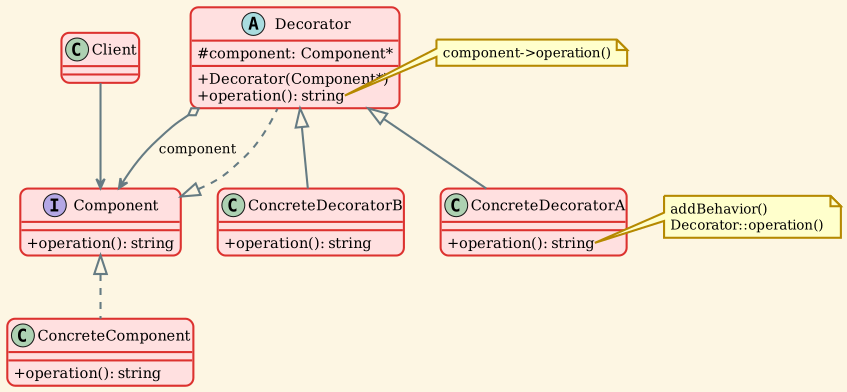
Participants
- Component
- Defines the interface for objects that can have responsibilities added
- In our example:
Componentinterface withoperation()method
- ConcreteComponent
- Defines an object to which additional responsibilities can be attached
- The base object that will be decorated
- In our example:
ConcreteComponentclass
- Decorator
- Maintains a reference to a Component object
- Defines an interface that conforms to Component's interface
- In our example:
Decoratorabstract class
- ConcreteDecorator
- Adds responsibilities to the component
- Can add state and behavior
- In our example:
ConcreteDecoratorAandConcreteDecoratorB
- Client - Works with objects through the Component interface - Doesn't need to know about decorators
Implementation
Component Interface
Decorator Classes
Usage Example
Applicability
Use the Decorator pattern when:
- You need to add responsibilities to objects dynamically and transparently - Without affecting other objects - Example: Adding features to a window at runtime
- You need to add responsibilities that can be withdrawn - Decorators can be removed by unwrapping - Example: Temporarily enabling logging
- Extension by subclassing is impractical - Too many combinations would result in class explosion - The class definition is hidden or unavailable for subclassing
- You want to add responsibilities to individual objects, not to all objects of a class - Some instances need extra functionality, others don't - Example: Some text fields need validation, others don't
Consequences
Benefits
-
More flexibility than static inheritance - Add or remove responsibilities at runtime - Mix and match decorators in any combination
-
Avoids feature-laden classes high in the hierarchy - Start with simple classes - Add functionality incrementally with decorators
-
Single Responsibility Principle - Each decorator focuses on one responsibility - Behaviors can be combined as needed
-
Open/Closed Principle - Add new decorators without modifying existing code - Extend functionality without changing original classes
-
Can apply the same decorator multiple times - Stack same decorator for cumulative effect - Example: Multiple layers of encryption
Drawbacks
-
Lots of small objects - System can become complex with many decorators - Can be harder to understand and debug
-
Decorator and component aren't identical - Can't rely on object identity - Type checking may fail if expecting specific type
-
Ordering matters - Different stacking orders can produce different results - Must carefully consider decorator sequence
-
Configuration complexity - Creating complex decorator combinations can be cumbersome - Consider using Factory or Builder patterns to help
Decorator vs Similar Patterns
Decorator vs Adapter
| Aspect | Decorator | Adapter |
|---|---|---|
| Intent | Add responsibilities without changing interface | Make incompatible interfaces work together |
| Interface | Keeps the same interface | Changes the interface |
| Purpose | Enhance functionality | Interface conversion |
| Number | Can stack multiple decorators | Typically single adapter |
Decorator vs Proxy
| Aspect | Decorator | Proxy |
|---|---|---|
| Intent | Add functionality | Control access |
| Transparency | Client knows about decoration | Client unaware of proxy |
| Multiple | Can stack many decorators | Usually single proxy |
| Interface | Can add new operations | Same interface as subject |
Decorator vs Composite
| Aspect | Decorator | Composite |
|---|---|---|
| Intent | Add responsibilities | Represent part-whole hierarchies |
| Structure | Linear chain | Tree structure |
| Purpose | Enhance single object | Treat individuals and groups uniformly |
| Multiple children | No (single wrapped object) | Yes (multiple children) |
Real-world Examples
-
I/O Streams - Component: FileStream - Decorators: BufferedStream, CompressedStream, EncryptedStream - Example:
EncryptedStream(CompressedStream(BufferedStream(FileStream)))- Java'sInputStreamhierarchy uses this pattern extensively -
GUI Components - Component: TextBox, Button - Decorators: ScrollDecorator, BorderDecorator, ShadowDecorator - Example:
BorderDecorator(ScrollDecorator(TextBox))- Java Swing's component borders use decorators -
Text Formatting - Component: PlainText - Decorators: BoldDecorator, ItalicDecorator, UnderlineDecorator - Example:
BoldDecorator(ItalicDecorator(PlainText))- Rich text editors often use this pattern -
Coffee Shop Orders - Component: Espresso, DarkRoast - Decorators: Milk, Sugar, Whip, Mocha - Example:
Milk(Sugar(Espresso))- Classic example from "Head First Design Patterns" -
Web Middleware - Component: HTTP Handler - Decorators: AuthenticationDecorator, LoggingDecorator, CompressionDecorator - Example: Express.js middleware chain - Each middleware wraps the next handler
-
Logging Systems - Component: BasicLogger - Decorators: TimestampDecorator, LevelDecorator, FileOutputDecorator - Example:
FileOutputDecorator(LevelDecorator(TimestampDecorator(BasicLogger)))
Implementation Considerations
1. Interface Conformance
Decorators must conform to the Component interface:
2. Omitting the Abstract Decorator
If you only need one decorator, you can skip the abstract Decorator class:
3. Keeping Component Simple
Keep the Component interface lean: - Define only essential operations - Don't clutter with decorator-specific operations - Decorators can add new operations if needed
4. Changing the Skin vs Changing the Guts
Decorator (Changing the Skin): - Changes interface or adds responsibilities - Doesn't change core algorithm - Wraps from outside
Strategy (Changing the Guts): - Changes internal algorithm/behavior - Same interface, different implementation - Replaces from inside
5. Decorator Transparency
Decorators should be transparent to clients:
6. Shared Decorators
Multiple objects can share the same decorator if: - Decorator is stateless - Decorator doesn't depend on wrapped component's state - Consider Flyweight pattern for shared decorators
Sample Output
Key Takeaways
- Decorator adds responsibilities to objects dynamically without modifying their class
- More flexible than inheritance - can add/remove decorations at runtime
- Decorators implement the same interface as the objects they wrap
- Multiple decorators can be stacked to combine behaviors
- Avoids class explosion from having to subclass for every combination
- Each decorator focuses on a single responsibility (SRP)
- New decorators can be added without modifying existing code (OCP)
- Order of decorators matters and affects the final behavior
- Commonly used in I/O streams, GUI components, and middleware systems
- Works well with Composite, Strategy, and other structural patterns