Prototype Pattern
Overview
Prototype is a creational design pattern that lets you copy existing objects without making your code dependent on their classes. The pattern delegates the cloning process to the actual objects that are being cloned.
Intent
The Prototype pattern specifies the kinds of objects to create using a prototypical instance, and creates new objects by copying this prototype. Instead of creating objects from scratch, you clone existing objects (prototypes) that serve as templates.
Problem
Say you have an object, and you want to create an exact copy of it. How would you do it? First, you have to create a new object of the same class. Then you have to go through all the fields of the original object and copy their values over to the new object.
Nice! But there's a catch. Not all objects can be copied that way because some of the object's fields may be private and not visible from outside of the object itself.
There's one more problem with the direct approach: sometimes you only know the interface that the object follows, but not its concrete class, which makes it impossible to use a constructor to create a copy.
Solution
The Prototype pattern delegates the cloning process to the actual objects that are being cloned. The pattern declares a common interface for all objects that support cloning. This interface lets you clone an object without coupling your code to the class of that object. Usually, such an interface contains just a single clone method.
The implementation of the clone method is very similar in all classes. The method creates an object of the current class and carries over all of the field values of the old object into the new one. You can even copy private fields because most programming languages let objects access private fields of other objects that belong to the same class.
An object that supports cloning is called a prototype. When your objects have dozens of fields and hundreds of possible configurations, cloning them might serve as an alternative to subclassing.
Structure
UML Diagram
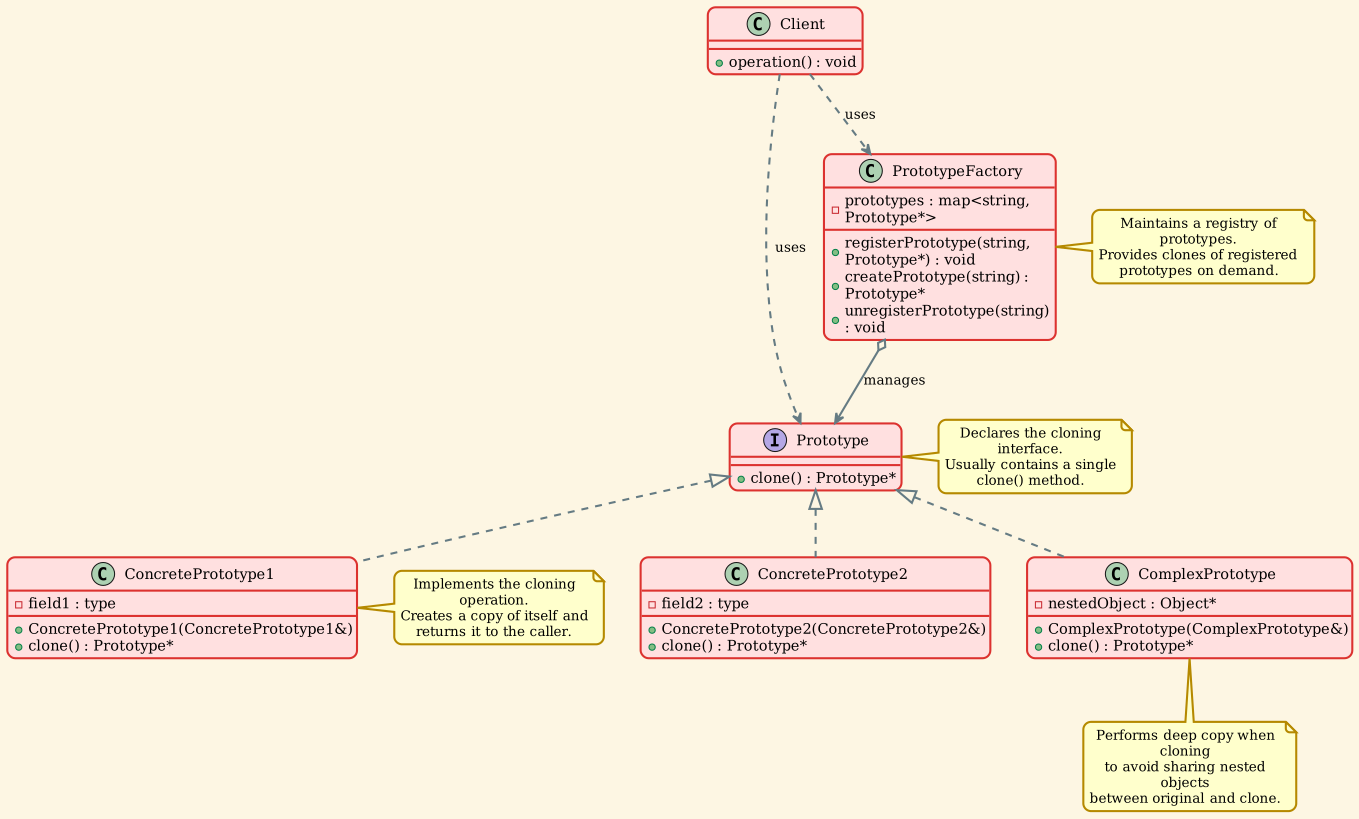
Participants
-
Prototype (Prototype)
- Declares an interface for cloning itself
- Usually contains a single
clone() method
-
ConcretePrototype (ConcretePrototype1, ConcretePrototype2, ComplexPrototype)
- Implements the cloning operation
- Creates a new instance and copies all fields from the original
- Handles deep copying for complex nested structures
-
PrototypeFactory (Optional - PrototypeFactory)
- Maintains a registry of prototype objects
- Provides a convenient way to access and clone frequently-used prototypes
- Also known as Prototype Registry or Prototype Manager
-
Client
- Creates new objects by cloning prototypes
- Works with prototypes through the Prototype interface
- Doesn't need to know the concrete classes of prototypes
Implementation
Prototype Interface
The Prototype interface declares the cloning method that all concrete prototypes must implement.
| // Prototype.h
#ifndef PROTOTYPE_H
#define PROTOTYPE_H
#include <string>
#include <memory>
#include <iostream>
/**
* @brief The Prototype interface declares the cloning method.
*
* In most cases, it's a single clone method. The Prototype pattern lets you
* copy existing objects without making your code dependent on their classes.
*/
class Prototype {
protected:
std::string prototypeName_;
float prototypeField_;
public:
Prototype() = default;
Prototype(const std::string& name) : prototypeName_(name) {}
virtual ~Prototype() = default;
/**
* @brief Clone method - creates a copy of the current object
*
* This is the key method of the Prototype pattern. It should create a new
* instance of the class and copy all field values from the current object
* to the new one.
*/
virtual std::unique_ptr<Prototype> clone() const = 0;
/**
* @brief Method to demonstrate that the prototype works
*/
virtual void method(float prototypeField) {
this->prototypeField_ = prototypeField;
std::cout << "Call Method from " << prototypeName_
<< " with field: " << prototypeField << std::endl;
}
};
/**
* @brief ConcretePrototype1 is a concrete implementation of Prototype.
*
* The clone method creates a new instance of the same class and copies all
* the fields to the new object. If your fields have complex types (like arrays
* or other objects), you need to perform a deep copy.
*/
class ConcretePrototype1 : public Prototype {
private:
float concretePrototypeField1_;
public:
ConcretePrototype1(const std::string& name, float concreteField)
: Prototype(name), concretePrototypeField1_(concreteField) {
}
/**
* @brief Clone method creates a new ConcretePrototype1 instance.
*
* Notice that the copy constructor is used here to properly copy all fields,
* including those from the base class.
*/
std::unique_ptr<Prototype> clone() const override {
return std::make_unique<ConcretePrototype1>(*this);
}
void method(float prototypeField) override {
Prototype::method(prototypeField);
std::cout << " ConcretePrototype1 specific field: "
<< concretePrototypeField1_ << std::endl;
}
};
/**
* @brief ConcretePrototype2 is another concrete implementation.
*
* Each concrete prototype implements cloning in its own way, but all of them
* follow the same Prototype interface.
*/
class ConcretePrototype2 : public Prototype {
private:
float concretePrototypeField2_;
public:
ConcretePrototype2(const std::string& name, float concreteField)
: Prototype(name), concretePrototypeField2_(concreteField) {
}
std::unique_ptr<Prototype> clone() const override {
return std::make_unique<ConcretePrototype2>(*this);
}
void method(float prototypeField) override {
Prototype::method(prototypeField);
std::cout << " ConcretePrototype2 specific field: "
<< concretePrototypeField2_ << std::endl;
}
};
/**
* @brief A more complex prototype with nested objects.
*
* This demonstrates deep copying when the prototype contains pointer members
* or other complex types.
*/
class ComplexPrototype : public Prototype {
private:
std::unique_ptr<std::string> nestedObject_;
public:
ComplexPrototype(const std::string& name, const std::string& nestedData)
: Prototype(name), nestedObject_(std::make_unique<std::string>(nestedData)) {
}
/**
* @brief Copy constructor for deep copying
*
* This is essential when the class contains pointers or resources that
* need to be duplicated rather than shared.
*/
ComplexPrototype(const ComplexPrototype& other)
: Prototype(other),
nestedObject_(std::make_unique<std::string>(*other.nestedObject_)) {
}
std::unique_ptr<Prototype> clone() const override {
return std::make_unique<ComplexPrototype>(*this);
}
void method(float prototypeField) override {
Prototype::method(prototypeField);
std::cout << " ComplexPrototype nested object: "
<< *nestedObject_ << std::endl;
}
void setNestedData(const std::string& data) {
*nestedObject_ = data;
}
std::string getNestedData() const {
return *nestedObject_;
}
};
#endif // PROTOTYPE_H
|
Prototype Factory (Registry)
The PrototypeFactory maintains a registry of prototype objects for convenient access.
| // PrototypeFactory.h
#ifndef PROTOTYPE_FACTORY_H
#define PROTOTYPE_FACTORY_H
#include "Prototype.h"
#include <unordered_map>
#include <string>
#include <memory>
#include <stdexcept>
/**
* @brief PrototypeFactory maintains a registry of prototype objects.
*
* The factory provides a convenient way to access frequently-used prototypes.
* Clients can request a clone of a prototype by its name, and the factory
* will return a new instance cloned from the registered prototype.
*
* This is also known as the Prototype Registry pattern.
*/
class PrototypeFactory {
private:
std::unordered_map<std::string, std::unique_ptr<Prototype>> prototypes_;
public:
PrototypeFactory() = default;
/**
* @brief Register a prototype with a given key
*
* The factory takes ownership of the prototype. Clients can later request
* clones of this prototype using the same key.
*
* @param key The identifier for this prototype
* @param prototype The prototype object to register
*/
void registerPrototype(const std::string& key, std::unique_ptr<Prototype> prototype) {
prototypes_[key] = std::move(prototype);
}
/**
* @brief Create a new object by cloning the registered prototype
*
* @param key The identifier of the prototype to clone
* @return A new object cloned from the registered prototype
* @throws std::runtime_error if the key is not found
*/
std::unique_ptr<Prototype> createPrototype(const std::string& key) {
auto it = prototypes_.find(key);
if (it != prototypes_.end()) {
return it->second->clone();
}
throw std::runtime_error("Prototype with key '" + key + "' not found");
}
/**
* @brief Remove a prototype from the registry
*
* @param key The identifier of the prototype to remove
*/
void unregisterPrototype(const std::string& key) {
prototypes_.erase(key);
}
/**
* @brief Check if a prototype is registered
*
* @param key The identifier to check
* @return true if the prototype exists, false otherwise
*/
bool hasPrototype(const std::string& key) const {
return prototypes_.find(key) != prototypes_.end();
}
};
#endif // PROTOTYPE_FACTORY_H
|
Demo Application
The client code demonstrates various aspects of the Prototype pattern.
| // prototype_demo.cpp
#include "Prototype.h"
#include "PrototypeFactory.h"
#include <iostream>
#include <memory>
/**
* @brief Client code that works with prototypes.
*
* The client code can clone any object that implements the Prototype interface
* without knowing the concrete class of that object.
*
* @param prototype A prototype object to be cloned
*/
void clientCode(Prototype& prototype) {
// Clone the prototype
std::unique_ptr<Prototype> clone = prototype.clone();
// Use both the original and the clone
std::cout << "\nOriginal prototype:" << std::endl;
prototype.method(10.5f);
std::cout << "\nCloned prototype:" << std::endl;
clone->method(20.7f);
}
/**
* @brief Demonstrates basic prototype cloning
*/
void demonstrateBasicCloning() {
std::cout << "=== Basic Prototype Cloning ===" << std::endl;
// Create concrete prototypes
std::unique_ptr<Prototype> p1 = std::make_unique<ConcretePrototype1>("PROTOTYPE_1", 50.5f);
clientCode(*p1);
std::cout << "\n" << std::string(50, '-') << std::endl;
std::unique_ptr<Prototype> p2 = std::make_unique<ConcretePrototype2>("PROTOTYPE_2", 60.8f);
clientCode(*p2);
}
/**
* @brief Demonstrates deep copying with complex objects
*/
void demonstrateDeepCopying() {
std::cout << "\n\n=== Deep Copying with Complex Objects ===" << std::endl;
// Create a complex prototype with nested objects
auto original = std::make_unique<ComplexPrototype>("COMPLEX_PROTOTYPE", "Original nested data");
std::cout << "\nOriginal prototype:" << std::endl;
original->method(100.0f);
// Clone the prototype
auto cloned = std::unique_ptr<ComplexPrototype>(
dynamic_cast<ComplexPrototype*>(original->clone().release())
);
std::cout << "\nCloned prototype (before modification):" << std::endl;
cloned->method(200.0f);
// Modify the cloned object's nested data
cloned->setNestedData("Modified nested data in clone");
// Verify that the original is not affected (deep copy)
std::cout << "\nAfter modifying clone's nested data:" << std::endl;
std::cout << "Original nested data: " << original->getNestedData() << std::endl;
std::cout << "Cloned nested data: " << cloned->getNestedData() << std::endl;
std::cout << "Deep copy successful - original is unchanged" << std::endl;
}
/**
* @brief Demonstrates using a prototype factory (registry)
*/
void demonstratePrototypeFactory() {
std::cout << "\n\n=== Prototype Factory (Registry) ===" << std::endl;
// Create a prototype factory
PrototypeFactory factory;
// Register prototypes
factory.registerPrototype("type1",
std::make_unique<ConcretePrototype1>("Registered_Type1", 111.1f));
factory.registerPrototype("type2",
std::make_unique<ConcretePrototype2>("Registered_Type2", 222.2f));
factory.registerPrototype("complex",
std::make_unique<ComplexPrototype>("Registered_Complex", "Factory data"));
std::cout << "\nCreating objects from factory by cloning registered prototypes:\n" << std::endl;
// Create new objects by cloning registered prototypes
std::unique_ptr<Prototype> obj1 = factory.createPrototype("type1");
std::cout << "Object created from 'type1' prototype:" << std::endl;
obj1->method(333.3f);
std::cout << std::endl;
std::unique_ptr<Prototype> obj2 = factory.createPrototype("type2");
std::cout << "Object created from 'type2' prototype:" << std::endl;
obj2->method(444.4f);
std::cout << std::endl;
std::unique_ptr<Prototype> obj3 = factory.createPrototype("complex");
std::cout << "Object created from 'complex' prototype:" << std::endl;
obj3->method(555.5f);
// Try to create from non-existent prototype
std::cout << "\nTrying to create from non-existent prototype:" << std::endl;
try {
factory.createPrototype("non_existent");
} catch (const std::runtime_error& e) {
std::cout << "Exception caught: " << e.what() << std::endl;
}
}
int main() {
std::cout << "=== Prototype Pattern Demo ===\n" << std::endl;
// Demonstrate basic cloning
demonstrateBasicCloning();
// Demonstrate deep copying
demonstrateDeepCopying();
// Demonstrate prototype factory
demonstratePrototypeFactory();
std::cout << "\n=== Demo Complete ===" << std::endl;
return 0;
}
|
Output:
| === Prototype Pattern Demo ===
=== Basic Prototype Cloning ===
Original prototype:
Call Method from PROTOTYPE_1 with field: 10.5
ConcretePrototype1 specific field: 50.5
Cloned prototype:
Call Method from PROTOTYPE_1 with field: 20.7
ConcretePrototype1 specific field: 50.5
--------------------------------------------------
Original prototype:
Call Method from PROTOTYPE_2 with field: 10.5
ConcretePrototype2 specific field: 60.8
Cloned prototype:
Call Method from PROTOTYPE_2 with field: 20.7
ConcretePrototype2 specific field: 60.8
=== Deep Copying with Complex Objects ===
Original prototype:
Call Method from COMPLEX_PROTOTYPE with field: 100
ComplexPrototype nested object: Original nested data
Cloned prototype (before modification):
Call Method from COMPLEX_PROTOTYPE with field: 200
ComplexPrototype nested object: Original nested data
After modifying clone's nested data:
Original nested data: Original nested data
Cloned nested data: Modified nested data in clone
Deep copy successful - original is unchanged
=== Prototype Factory (Registry) ===
Creating objects from factory by cloning registered prototypes:
Object created from 'type1' prototype:
Call Method from Registered_Type1 with field: 333.3
ConcretePrototype1 specific field: 111.1
Object created from 'type2' prototype:
Call Method from Registered_Type2 with field: 444.4
ConcretePrototype2 specific field: 222.2
Object created from 'complex' prototype:
Call Method from Registered_Complex with field: 555.5
ComplexPrototype nested object: Factory data
Trying to create from non-existent prototype:
Exception caught: Prototype with key 'non_existent' not found
=== Demo Complete ===
|
The output demonstrates:
1. Basic cloning creates independent copies with the same initial state
2. Deep copying ensures nested objects are also copied, not just referenced
3. Prototype factory (registry) allows creating objects by name without knowing their concrete types
Key Concepts
Shallow Copy vs Deep Copy
Shallow Copy - Copies the object's field values. If fields are pointers, only the pointer values are copied (both objects point to the same data).
| // Shallow copy - DANGEROUS with pointers
class ShallowPrototype {
int* data_;
public:
ShallowPrototype* clone() {
ShallowPrototype* copy = new ShallowPrototype();
copy->data_ = this->data_; // Both point to same memory!
return copy;
}
};
|
Deep Copy - Creates copies of all nested objects, ensuring complete independence.
| // Deep copy - SAFE with pointers
class DeepPrototype {
int* data_;
public:
DeepPrototype* clone() {
DeepPrototype* copy = new DeepPrototype();
copy->data_ = new int(*this->data_); // New memory allocated
return copy;
}
};
|
Prototype Registry
A centralized location for storing and retrieving prototypes:
| PrototypeFactory factory;
// Register prototypes
factory.registerPrototype("car", std::make_unique<Car>());
factory.registerPrototype("truck", std::make_unique<Truck>());
// Clone from registry
auto vehicle1 = factory.createPrototype("car");
auto vehicle2 = factory.createPrototype("truck");
|
Copy Constructor Pattern
C++ provides copy constructors that work well with the Prototype pattern:
| class MyClass {
public:
// Copy constructor
MyClass(const MyClass& other) {
// Copy all fields
}
// Clone method uses copy constructor
std::unique_ptr<MyClass> clone() const {
return std::make_unique<MyClass>(*this);
}
};
|
Applicability
Use the Prototype pattern when:
1. Expensive Object Creation
Creating new instances is more expensive than copying existing ones.
Example: Objects that require database queries, network calls, or complex computations during initialization.
2. Avoiding Parallel Class Hierarchies
You want to avoid building a parallel hierarchy of factory classes.
Example: Instead of CarFactory, TruckFactory, BikeFactory, use prototype instances of Car, Truck, Bike.
3. Limited Object Variations
Instances of a class can have only a few different combinations of state.
Example: A game with a few character types, where each character has preset attributes.
4. Runtime Object Specification
Objects to be created are specified at runtime.
Example: A graphics editor where users can select and clone shapes from a palette.
5. Hiding Complex Initialization
You want to hide the complexity of object creation from clients.
Example: Configuration objects with complex initialization logic.
Advantages
1. No Dependency on Concrete Classes
You can clone objects without coupling to their concrete classes.
2. Reduced Subclassing
Eliminates the need for parallel factory class hierarchies.
3. Complex Object Cloning
Can clone complex objects with nested structures more conveniently than manual construction.
4. Runtime Flexibility
Add and remove prototypes at runtime.
5. Alternative to Inheritance
Provides an alternative to Factory Method when object variations are state-based rather than behavior-based.
Disadvantages
1. Complex Deep Copying
Cloning complex objects with circular references can be tricky.
2. Clone Method Implementation
Every class must implement the clone method, which may be challenging for classes with complex internal structures.
3. Difficult with Circular References
Objects with circular references need special handling to avoid infinite loops during cloning.
Real-World Examples
Example 1: Game Characters
| // Character prototype
class Character {
protected:
std::string name_;
int health_;
int strength_;
std::vector<std::string> abilities_;
public:
Character(const std::string& name, int health, int strength)
: name_(name), health_(health), strength_(strength) {}
virtual ~Character() = default;
virtual std::unique_ptr<Character> clone() const = 0;
void addAbility(const std::string& ability) {
abilities_.push_back(ability);
}
void display() const {
std::cout << "Character: " << name_
<< " (HP: " << health_
<< ", STR: " << strength_ << ")\n";
std::cout << "Abilities: ";
for (const auto& ability : abilities_) {
std::cout << ability << " ";
}
std::cout << "\n";
}
};
// Warrior prototype
class Warrior : public Character {
public:
Warrior() : Character("Warrior", 150, 20) {
addAbility("Sword Strike");
addAbility("Shield Block");
}
std::unique_ptr<Character> clone() const override {
return std::make_unique<Warrior>(*this);
}
};
// Mage prototype
class Mage : public Character {
public:
Mage() : Character("Mage", 80, 10) {
addAbility("Fireball");
addAbility("Ice Bolt");
addAbility("Teleport");
}
std::unique_ptr<Character> clone() const override {
return std::make_unique<Mage>(*this);
}
};
// Usage in game
class CharacterFactory {
private:
std::unordered_map<std::string, std::unique_ptr<Character>> prototypes_;
public:
CharacterFactory() {
prototypes_["warrior"] = std::make_unique<Warrior>();
prototypes_["mage"] = std::make_unique<Mage>();
}
std::unique_ptr<Character> createCharacter(const std::string& type) {
return prototypes_[type]->clone();
}
};
// Client code
CharacterFactory factory;
auto player1 = factory.createCharacter("warrior");
auto player2 = factory.createCharacter("mage");
auto enemy1 = factory.createCharacter("warrior");
|
Example 2: Document Templates
| // Document prototype
class Document {
protected:
std::string header_;
std::string footer_;
std::vector<std::string> sections_;
std::string theme_;
public:
virtual ~Document() = default;
virtual std::unique_ptr<Document> clone() const = 0;
void setContent(const std::string& content) {
sections_.push_back(content);
}
virtual void render() const {
std::cout << "=== " << header_ << " ===" << std::endl;
for (const auto& section : sections_) {
std::cout << section << std::endl;
}
std::cout << "--- " << footer_ << " ---" << std::endl;
}
};
// Report template
class ReportTemplate : public Document {
public:
ReportTemplate() {
header_ = "Monthly Report";
footer_ = "Confidential";
theme_ = "Professional";
sections_.push_back("Executive Summary");
sections_.push_back("Financial Data");
sections_.push_back("Conclusions");
}
std::unique_ptr<Document> clone() const override {
return std::make_unique<ReportTemplate>(*this);
}
};
// Invoice template
class InvoiceTemplate : public Document {
public:
InvoiceTemplate() {
header_ = "Invoice";
footer_ = "Thank you for your business";
theme_ = "Corporate";
sections_.push_back("Bill To:");
sections_.push_back("Items:");
sections_.push_back("Total:");
}
std::unique_ptr<Document> clone() const override {
return std::make_unique<InvoiceTemplate>(*this);
}
};
// Document manager
class DocumentManager {
private:
std::unordered_map<std::string, std::unique_ptr<Document>> templates_;
public:
void registerTemplate(const std::string& name, std::unique_ptr<Document> doc) {
templates_[name] = std::move(doc);
}
std::unique_ptr<Document> createDocument(const std::string& templateName) {
if (templates_.find(templateName) != templates_.end()) {
return templates_[templateName]->clone();
}
return nullptr;
}
};
// Usage
DocumentManager manager;
manager.registerTemplate("report", std::make_unique<ReportTemplate>());
manager.registerTemplate("invoice", std::make_unique<InvoiceTemplate>());
auto doc1 = manager.createDocument("report");
doc1->setContent("Q4 2024 Performance");
doc1->render();
|
Example 3: UI Component Library
| // UI Component prototype
class UIComponent {
protected:
int x_, y_;
int width_, height_;
std::string backgroundColor_;
std::string borderStyle_;
public:
UIComponent(int x, int y, int w, int h)
: x_(x), y_(y), width_(w), height_(h),
backgroundColor_("white"), borderStyle_("solid") {}
virtual ~UIComponent() = default;
virtual std::unique_ptr<UIComponent> clone() const = 0;
void setPosition(int x, int y) {
x_ = x;
y_ = y;
}
void setStyle(const std::string& bgColor, const std::string& border) {
backgroundColor_ = bgColor;
borderStyle_ = border;
}
virtual void render() const {
std::cout << "Component at (" << x_ << "," << y_ << ") "
<< width_ << "x" << height_
<< " [" << backgroundColor_ << ", " << borderStyle_ << "]"
<< std::endl;
}
};
// Button prototype
class Button : public UIComponent {
private:
std::string label_;
public:
Button() : UIComponent(0, 0, 100, 30), label_("Button") {
backgroundColor_ = "blue";
}
Button(const Button& other) : UIComponent(other), label_(other.label_) {}
std::unique_ptr<UIComponent> clone() const override {
return std::make_unique<Button>(*this);
}
void setLabel(const std::string& label) {
label_ = label;
}
void render() const override {
UIComponent::render();
std::cout << " Label: " << label_ << std::endl;
}
};
// TextBox prototype
class TextBox : public UIComponent {
private:
std::string placeholder_;
public:
TextBox() : UIComponent(0, 0, 200, 25), placeholder_("Enter text...") {
backgroundColor_ = "white";
borderStyle_ = "1px solid gray";
}
TextBox(const TextBox& other)
: UIComponent(other), placeholder_(other.placeholder_) {}
std::unique_ptr<UIComponent> clone() const override {
return std::make_unique<TextBox>(*this);
}
void setPlaceholder(const std::string& placeholder) {
placeholder_ = placeholder;
}
void render() const override {
UIComponent::render();
std::cout << " Placeholder: " << placeholder_ << std::endl;
}
};
// UI Component Factory
class UIFactory {
private:
std::unordered_map<std::string, std::unique_ptr<UIComponent>> prototypes_;
public:
UIFactory() {
// Register default prototypes
prototypes_["button"] = std::make_unique<Button>();
prototypes_["textbox"] = std::make_unique<TextBox>();
}
std::unique_ptr<UIComponent> createComponent(const std::string& type) {
if (prototypes_.find(type) != prototypes_.end()) {
return prototypes_[type]->clone();
}
return nullptr;
}
};
// Usage
UIFactory factory;
auto button1 = factory.createComponent("button");
button1->setPosition(10, 10);
button1->render();
auto button2 = factory.createComponent("button");
button2->setPosition(10, 50);
button2->render();
auto textbox = factory.createComponent("textbox");
textbox->setPosition(10, 90);
textbox->render();
|
Example 4: Configuration Objects
| // Configuration prototype
class Configuration {
protected:
std::string environment_;
std::string databaseUrl_;
int timeout_;
bool logging_;
std::unordered_map<std::string, std::string> settings_;
public:
virtual ~Configuration() = default;
virtual std::unique_ptr<Configuration> clone() const = 0;
void setSetting(const std::string& key, const std::string& value) {
settings_[key] = value;
}
void display() const {
std::cout << "Environment: " << environment_ << std::endl;
std::cout << "Database: " << databaseUrl_ << std::endl;
std::cout << "Timeout: " << timeout_ << "ms" << std::endl;
std::cout << "Logging: " << (logging_ ? "enabled" : "disabled") << std::endl;
std::cout << "Custom settings:" << std::endl;
for (const auto& [key, value] : settings_) {
std::cout << " " << key << " = " << value << std::endl;
}
}
};
// Development configuration
class DevelopmentConfig : public Configuration {
public:
DevelopmentConfig() {
environment_ = "development";
databaseUrl_ = "localhost:5432/dev_db";
timeout_ = 5000;
logging_ = true;
}
std::unique_ptr<Configuration> clone() const override {
return std::make_unique<DevelopmentConfig>(*this);
}
};
// Production configuration
class ProductionConfig : public Configuration {
public:
ProductionConfig() {
environment_ = "production";
databaseUrl_ = "prod-server:5432/prod_db";
timeout_ = 30000;
logging_ = false;
}
std::unique_ptr<Configuration> clone() const override {
return std::make_unique<ProductionConfig>(*this);
}
};
// Configuration manager
class ConfigManager {
private:
std::unordered_map<std::string, std::unique_ptr<Configuration>> configs_;
public:
ConfigManager() {
configs_["dev"] = std::make_unique<DevelopmentConfig>();
configs_["prod"] = std::make_unique<ProductionConfig>();
}
std::unique_ptr<Configuration> getConfig(const std::string& env) {
if (configs_.find(env) != configs_.end()) {
auto config = configs_[env]->clone();
// Customize if needed
return config;
}
return nullptr;
}
};
|
Abstract Factory
Relationship: Both patterns can be used to create objects without specifying concrete classes. Abstract Factory can store prototypes and return their clones.
Difference: Abstract Factory emphasizes creating families of related objects, while Prototype focuses on cloning existing objects.
Factory Method
Relationship: Factory Method can use Prototype as an alternative to subclassing.
Difference: Factory Method relies on inheritance, while Prototype relies on delegation (cloning).
Composite
Relationship: Composite trees can be cloned using the Prototype pattern.
Usage: Clone entire tree structures efficiently.
Decorator
Relationship: Both patterns involve object composition. Decorator can be applied to cloned objects.
Difference: Decorator adds responsibilities, Prototype copies objects.
Memento
Relationship: Both deal with object state. Memento saves state, Prototype clones entire objects.
Difference: Memento is for undo/redo, Prototype is for object creation.
Singleton
Relationship: Prototype Registry can be implemented as a Singleton.
Difference: Singleton ensures one instance, Prototype creates many copies.
Common Mistakes
1. Shallow Copy Issues
Wrong: Forgetting to perform deep copy for nested objects.
| // BAD: Shallow copy with pointers
class BadPrototype {
int* data_;
public:
BadPrototype* clone() {
BadPrototype* copy = new BadPrototype();
copy->data_ = this->data_; // Shared pointer!
return copy;
}
};
|
Right: Always deep copy nested objects.
| // GOOD: Deep copy
class GoodPrototype {
int* data_;
public:
GoodPrototype(const GoodPrototype& other) {
data_ = new int(*other.data_); // New allocation
}
std::unique_ptr<GoodPrototype> clone() const {
return std::make_unique<GoodPrototype>(*this);
}
};
|
2. Not Handling Circular References
Wrong: Cloning objects with circular references without special handling.
Right: Track cloned objects to handle circular references.
3. Forgetting to Update Clone Method
Wrong: Adding new fields but forgetting to update the clone method.
Right: Use copy constructors and ensure all fields are copied.
4. Breaking Encapsulation
Wrong: Exposing internal state just to enable cloning.
Right: Use proper copy constructors and friend functions if necessary.
Best Practices
1. Use Copy Constructors
| class MyClass {
public:
// Proper copy constructor
MyClass(const MyClass& other) : field1_(other.field1_), field2_(other.field2_) {
// Deep copy nested objects
}
// Clone uses copy constructor
std::unique_ptr<MyClass> clone() const {
return std::make_unique<MyClass>(*this);
}
};
|
2. Return Smart Pointers
| // Use unique_ptr for ownership transfer
virtual std::unique_ptr<Prototype> clone() const = 0;
|
3. Make Clone Const
| // Clone should not modify the original
virtual std::unique_ptr<Prototype> clone() const = 0;
|
4. Document Deep vs Shallow Copy
| /**
* @brief Creates a deep copy of this object.
*
* All nested objects and resources are duplicated.
* The cloned object is completely independent of the original.
*/
std::unique_ptr<MyClass> clone() const;
|
5. Consider Clone Registry
| // Centralize prototype management
class PrototypeRegistry {
static PrototypeRegistry& instance();
void registerPrototype(const std::string& key, Prototype* proto);
Prototype* getPrototype(const std::string& key);
};
|
6. Handle Polymorphic Cloning
| // Use virtual clone for polymorphic objects
class Base {
public:
virtual std::unique_ptr<Base> clone() const = 0;
};
class Derived : public Base {
public:
std::unique_ptr<Base> clone() const override {
return std::make_unique<Derived>(*this);
}
};
|
Implementation Variations
1. Cloneable Interface
| template<typename T>
class Cloneable {
public:
virtual ~Cloneable() = default;
virtual std::unique_ptr<T> clone() const = 0;
};
class MyClass : public Cloneable<MyClass> {
public:
std::unique_ptr<MyClass> clone() const override {
return std::make_unique<MyClass>(*this);
}
};
|
2. CRTP (Curiously Recurring Template Pattern)
| template<typename Derived>
class Prototype {
public:
std::unique_ptr<Derived> clone() const {
return std::make_unique<Derived>(static_cast<const Derived&>(*this));
}
};
class ConcreteClass : public Prototype<ConcreteClass> {
// Inherits clone method automatically
};
|
3. Registry with Lazy Initialization
| class LazyPrototypeFactory {
private:
std::unordered_map<std::string, std::function<std::unique_ptr<Prototype>()>> creators_;
public:
void registerCreator(const std::string& key,
std::function<std::unique_ptr<Prototype>()> creator) {
creators_[key] = creator;
}
std::unique_ptr<Prototype> create(const std::string& key) {
if (creators_.find(key) != creators_.end()) {
return creators_[key]();
}
return nullptr;
}
};
|
Summary
The Prototype pattern is a powerful creational design pattern that:
- Creates new objects by cloning existing ones
- Eliminates the need for subclassing to create object variants
- Reduces the complexity of object creation when objects have many configurations
- Allows adding and removing prototypes at runtime
- Provides an alternative to Factory Method when variations are state-based
- Can significantly improve performance when object creation is expensive
- Works well with Prototype Registry for centralized prototype management
Use it when object creation is expensive, you want to avoid parallel factory hierarchies, or you need to create objects with many possible configurations. Be careful with deep copying of complex nested structures and circular references.
Comparison: Prototype vs Other Creational Patterns
| Aspect |
Prototype |
Factory Method |
Abstract Factory |
Builder |
| Creation |
Clone existing |
Instantiate new |
Instantiate family |
Step-by-step |
| Complexity |
Low-Medium |
Low |
Medium |
High |
| Runtime |
Add/remove prototypes |
Fixed factories |
Fixed factories |
Fixed builders |
| State |
Preserves state |
Fresh state |
Fresh state |
Builds state |
| Performance |
Fast (if cloning is fast) |
Slow (construction) |
Slow (construction) |
Slow (multi-step) |
| Flexibility |
High (state-based) |
Medium (type-based) |
Medium (family-based) |
High (configuration) |
| Use Case |
Many variations |
Type variants |
Related objects |
Complex objects |