State Pattern
Overview
The State Pattern is a behavioral design pattern that allows an object to alter its behavior when its internal state changes. The object will appear to change its class. This pattern encapsulates state-specific behavior into separate state classes and delegates state-dependent operations to the current state object.
Intent
- Allow an object to alter its behavior when its internal state changes
- Encapsulate state-specific behavior in separate state objects
- Make state transitions explicit and eliminate large conditional statements
- Localize state-specific behavior and partition behavior for different states
Problem
When an object's behavior depends on its state, and it must change its behavior at runtime depending on that state, you often end up with large conditional statements (if-else or switch-case) that check the state and execute different code. This approach becomes difficult to maintain as:
- Adding new states requires modifying existing code
- State-dependent behavior is scattered throughout the class
- State transitions are implicit and hard to understand
- The code violates the Open/Closed Principle
Solution
Define separate state classes that encapsulate state-specific behavior. The context maintains a reference to one of the concrete state objects and delegates all state-dependent operations to it. When the state changes, the context switches to a different state object.
Structure
Class Diagram
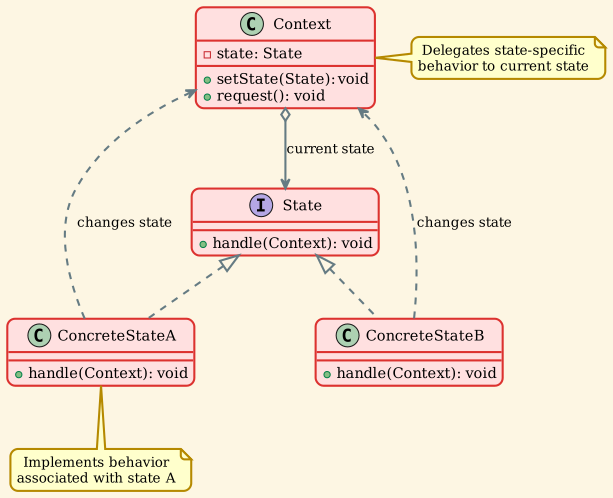
Components
-
Context
- Maintains an instance of a concrete state that defines the current state
- Delegates state-specific requests to the current state object
- May pass itself as an argument to the state object
-
State (Interface)
- Defines an interface for encapsulating behavior associated with a particular state
- Declares methods that all concrete states must implement
-
ConcreteState
- Implements behavior associated with a specific state of the context
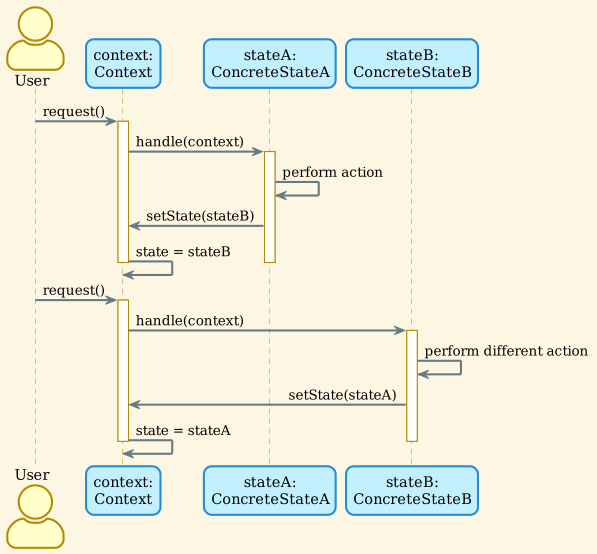
- Can trigger state transitions by calling context's setState()
- Each concrete state knows which state should follow it
Implementation Examples
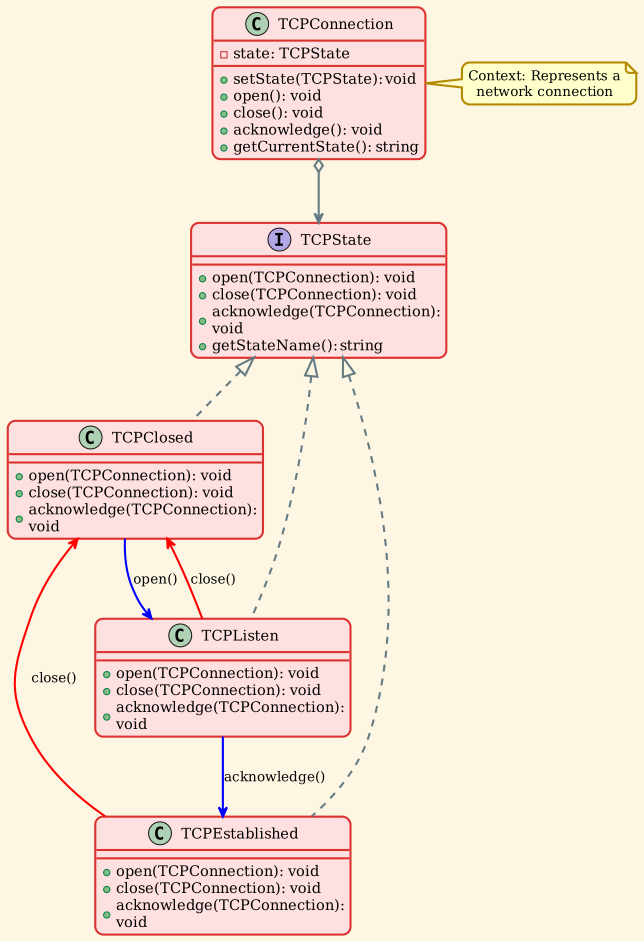
Example 1: TCP Connection State
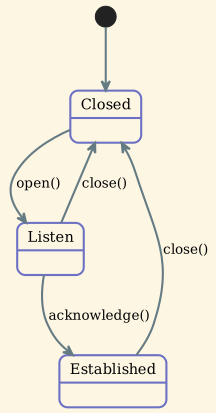
Network connections go through different states (Closed, Listen, Established).
State Transitions:
Usage:
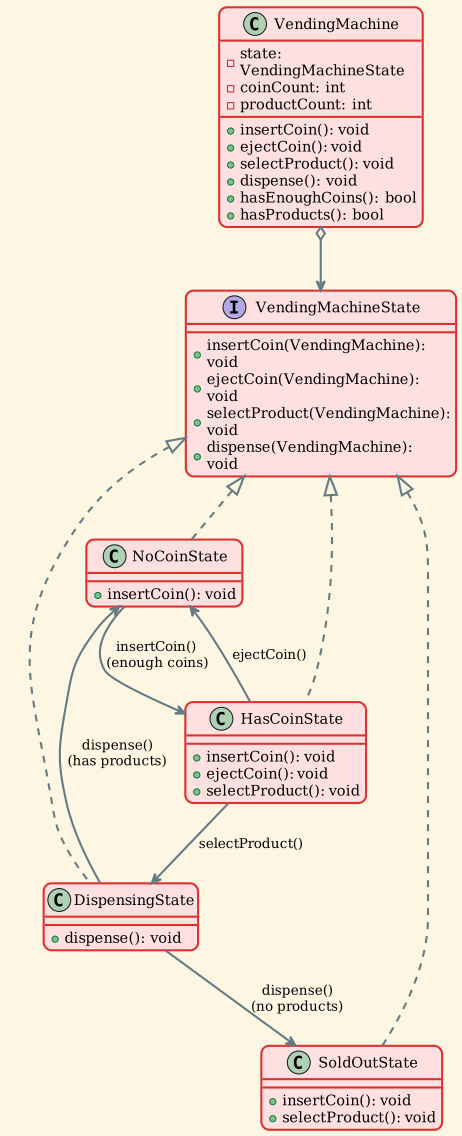
Example 2: Vending Machine
A vending machine has different states based on coin insertion and product availability.
Usage:
Example 3: Document Workflow
Documents go through different stages: Draft, Moderation, Published.
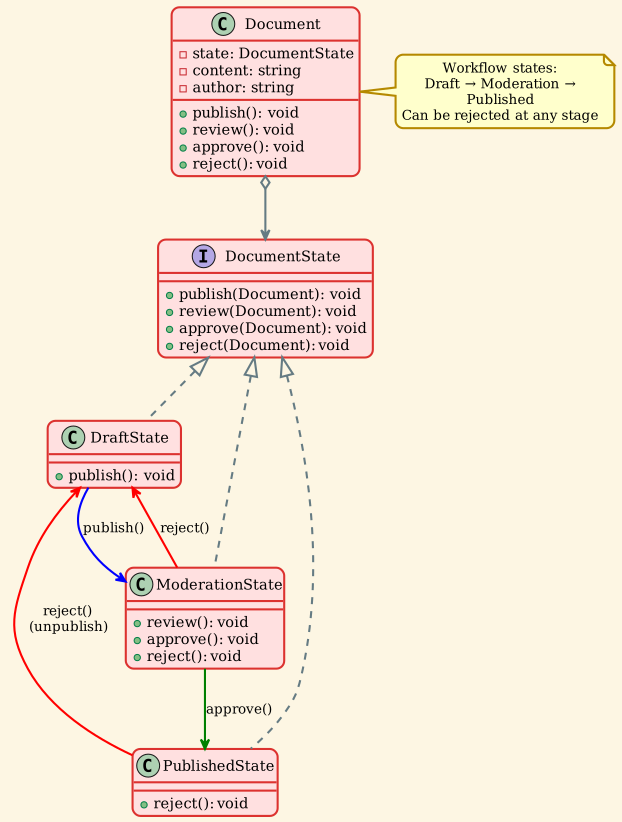
Usage:
Example 4: Media Player
Media players have different playback states: Stopped, Playing, Paused.
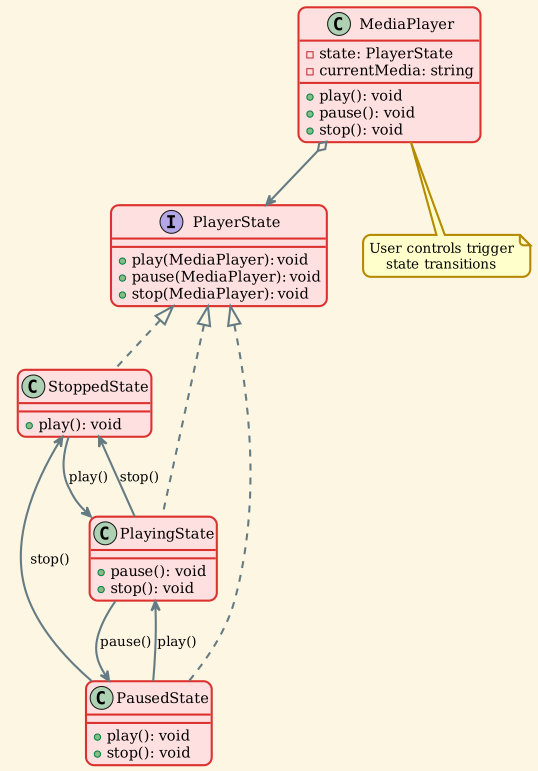
State Behavior:
| Operation | Stopped | Playing | Paused |
|---|---|---|---|
| play() | Start playback (→ Playing) | Already playing | Resume playback (→ Playing) |
| pause() | Cannot pause | Pause playback (→ Paused) | Already paused |
| stop() | Already stopped | Stop playback (→ Stopped) | Stop playback (→ Stopped) |
Usage:
Sequence Diagram
Real-World Applications
1. Network Protocols
TCP/IP Connection States:
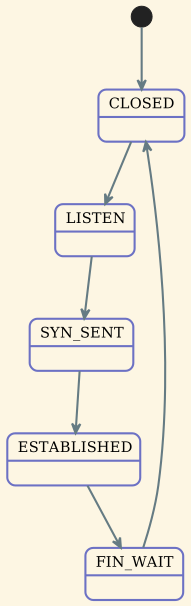
Each state handles packets differently: - LISTEN: Accepts connection requests - ESTABLISHED: Transfers data - FIN_WAIT: Handles connection termination
HTTP Request Handling:

2. User Interface
Form Validation:

Button States: - Enabled: Responds to clicks - Disabled: Ignores input - Pressed: Visual feedback - Loading: Shows spinner
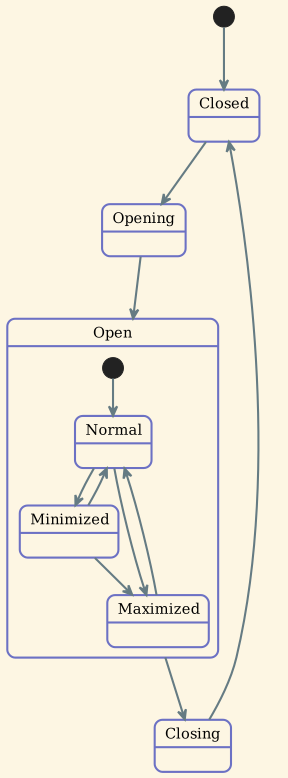
Dialog States:
3. Workflow Systems
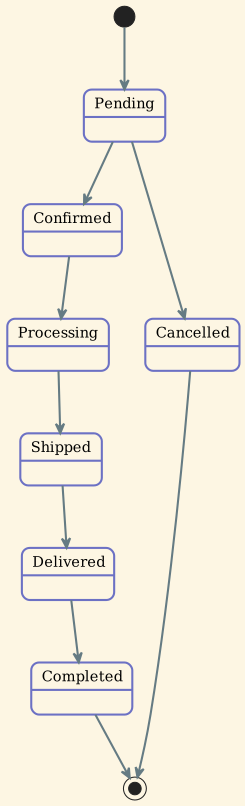
Order Processing:
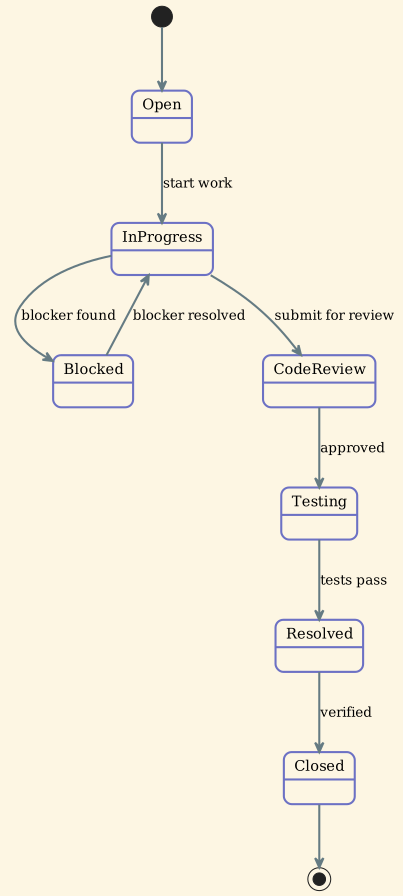
Issue Tracking:
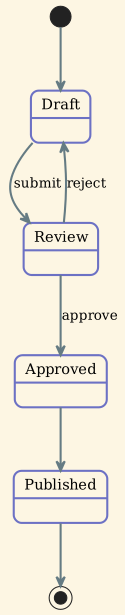
Document Approval:
4. Game Development
Character States:
States handle: - Input differently (can't jump while attacking) - Animation (different sprites per state) - Transitions (can run from walking, can't walk while jumping)
AI Behavior:
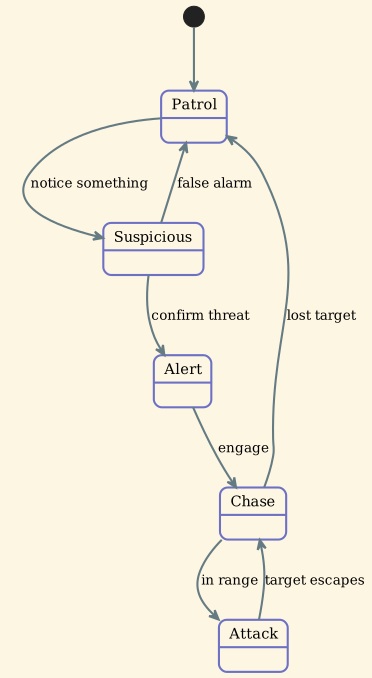
Game Flow:
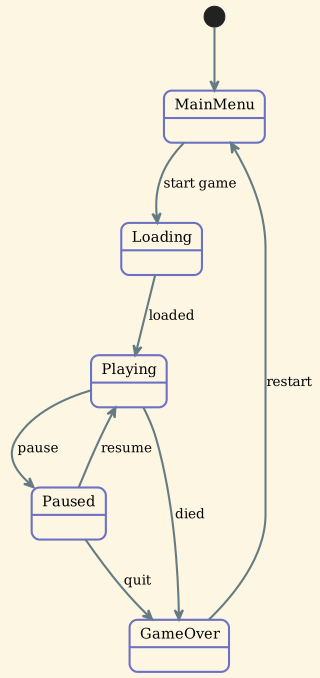
5. Media Applications
Video Player: - Stopped: Show thumbnail - Buffering: Show loading indicator - Playing: Update progress bar - Paused: Show play button - Error: Show error message
Audio Recording:
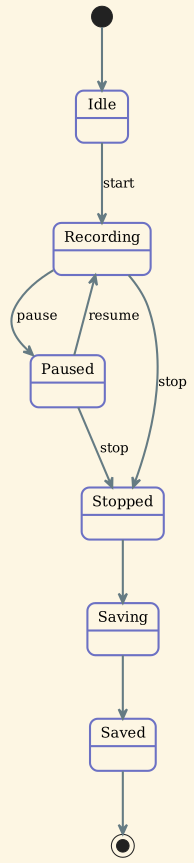
6. Transaction Systems
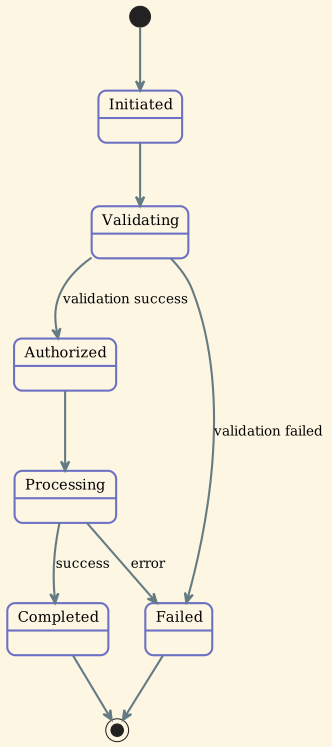
ATM Transaction:
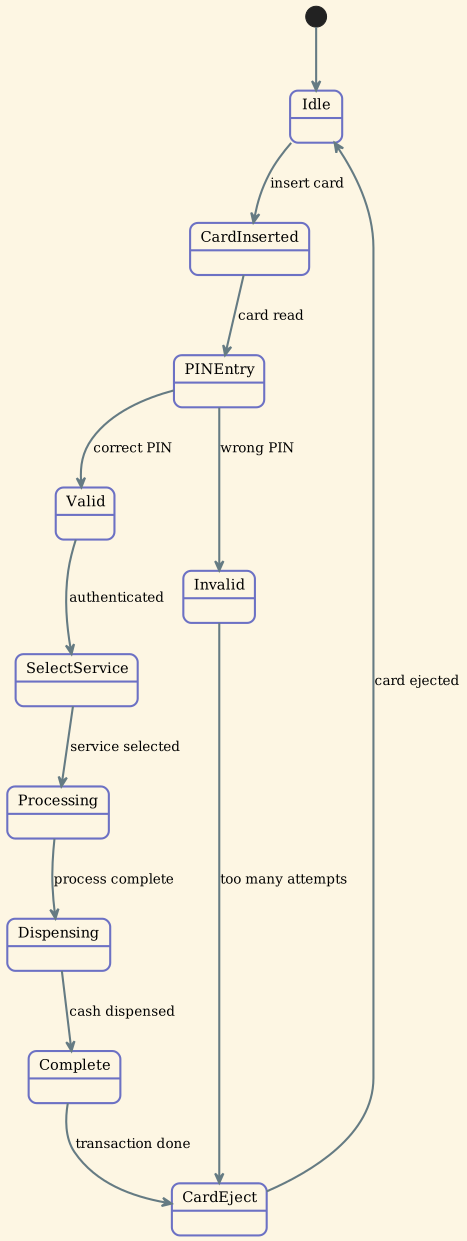
Payment Processing:
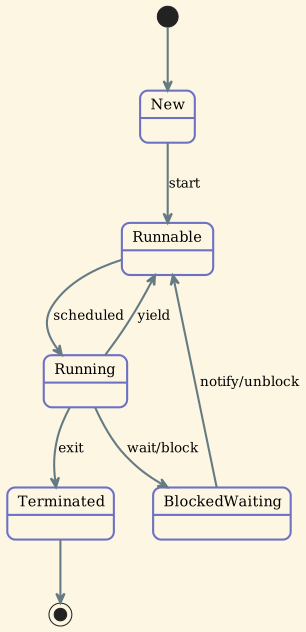
7. Thread and Process States
Thread Lifecycle:
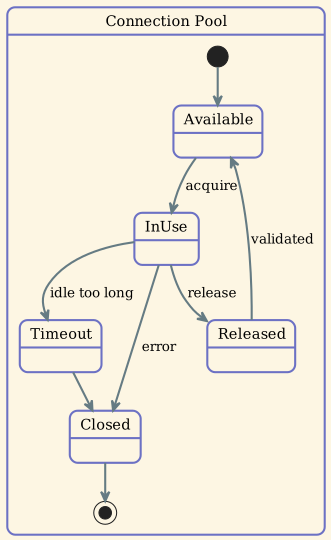
Connection Pool:
Design Considerations
Advantages
Eliminates Conditional Statements: Replaces large if-else or switch statements with polymorphism.
Explicit State Transitions: State transitions are explicit and centralized in state classes.
Single Responsibility Principle: Each state class encapsulates behavior for one state only.
Open/Closed Principle: You can add new states without modifying existing state classes or the context.
Improved Maintainability: State-specific code is isolated and easier to understand and modify.
Testability: Each state can be tested independently.
Disadvantages
Increased Number of Classes: Each state requires a separate class, increasing code volume.
Overkill for Simple Cases: For simple state machines with 2-3 states, a simple flag might suffice.
State Knowledge: States may need to know about other states, creating dependencies.
Context-State Coupling: States often need access to context methods, creating coupling.
State vs Strategy Pattern
| Aspect | State Pattern | Strategy Pattern |
|---|---|---|
| Intent | Change behavior based on internal state | Select algorithm from family of algorithms |
| Who decides | Context or states themselves | Client or context |
| Transitions | States can transition to other states | Strategies are independent |
| Context awareness | States often know about context | Strategies may not know context |
| Use case | Object behavior changes with state | Different ways to achieve same goal |
State Pattern:
Strategy Pattern:
When to Use State Pattern
Use State Pattern when:
- An object's behavior depends on its state and must change at runtime
- Operations have large, multipart conditional statements that depend on the object's state
- State transitions are complex and need to be explicit
- State-specific behavior is scattered across multiple operations
- You want to avoid code duplication for state-specific behavior
Example Scenarios: - Network connection management - Game character behavior - UI component states - Workflow systems - Media player controls - Transaction processing
Avoid State Pattern when:
- You have only 2-3 simple states
- State changes are rare
- Simple boolean flags suffice
- State-specific behavior is minimal
- The overhead of multiple classes outweighs benefits
Use simpler alternatives: - Boolean flags for binary states - Enum + switch for simple state machines - State machines libraries for complex but well-defined FSMs
Implementation Considerations
1. Who Defines State Transitions?
Option A: States define transitions (more flexible)
Option B: Context defines transitions (centralized)
2. State Object Creation
Option A: Create on demand (memory efficient)
Option B: Flyweight pattern (performance efficient)
3. State Entry/Exit Actions
Best Practices
1. Use Smart Pointers
2. Define Clear State Interfaces
3. Validate State Transitions
4. Log State Transitions
5. Consider State Hierarchies
For complex state machines with substates:
Related Patterns
- Strategy: Similar structure but different intent. Strategy focuses on algorithm selection, State on behavior change based on state.
- Flyweight: Can be used to share state objects if they have no instance-specific data.
- Singleton: State objects are often implemented as singletons if they have no state-specific data.
- Bridge: Similar structure but Bridge separates interface from implementation, while State is about behavior change.
Summary
The State Pattern provides an elegant solution for implementing state machines by: - Eliminating complex conditionals with polymorphic state objects - Making state transitions explicit and easy to understand - Localizing state-specific behavior in separate classes - Supporting the Open/Closed Principle for adding new states
Use it when your object's behavior significantly depends on its state and state transitions are complex. Avoid it for simple state machines where boolean flags or enums would suffice. The pattern shines in scenarios like network protocols, UI components, workflow systems, and game development where state-dependent behavior is complex and needs to be maintainable.