Composite Pattern
Intent
The Composite pattern composes objects into tree structures to represent part-whole hierarchies. Composite lets clients treat individual objects and compositions of objects uniformly.
Problem
When working with tree structures that represent part-whole hierarchies, you often need to:
- Treat both individual objects (leaves) and compositions of objects (composites) uniformly
- Perform operations on individual objects and groups of objects in the same way
- Build complex tree structures from simpler components
For example, in a graphics application, you might have primitive shapes (circles, rectangles) and composite shapes (groups of shapes). You want to be able to draw, move, or resize both individual shapes and groups of shapes without distinguishing between them.
Without the Composite pattern, client code becomes cluttered with type-checking logic to determine whether it's dealing with an individual object or a collection.
Solution
The Composite pattern suggests defining a common interface (Component) for both simple objects (Leaf) and containers (Composite). This allows clients to treat individual objects and compositions uniformly through the Component interface.
The key is that both Leaf and Composite classes implement the same interface, and Composite can contain both Leaf and other Composite objects, forming a recursive tree structure.
Structure
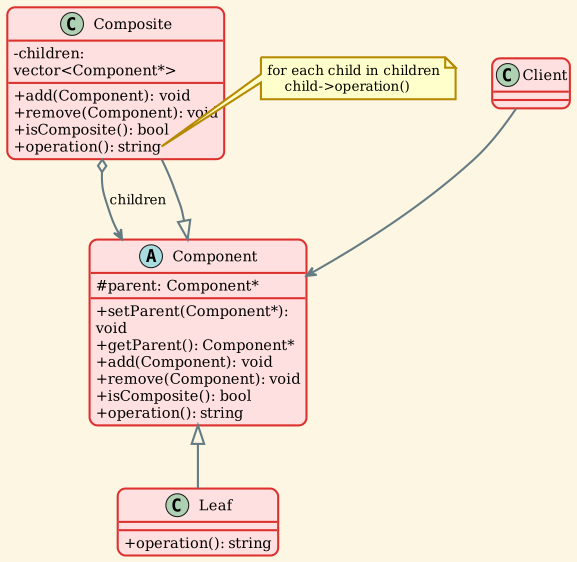
Participants
- Component
- Declares the interface for objects in the composition
- Implements default behavior common to all classes
- Declares interface for accessing and managing child components
- In our example:
Componentabstract class
- Leaf
- Represents leaf objects in the composition (no children)
- Defines behavior for primitive objects
- In our example:
Leafclass
- Composite
- Defines behavior for components having children
- Stores child components
- Implements child-related operations in the Component interface
- In our example:
Compositeclass
- Client - Manipulates objects in the composition through the Component interface - Works uniformly with both leaf and composite objects
Implementation
Component Interface
Leaf Class
Composite Class
Usage Example
Applicability
Use the Composite pattern when:
- You want to represent part-whole hierarchies of objects - Tree structures where nodes can be either leaves or containers - Example: File system, organization chart, UI component hierarchy
- You want clients to ignore the difference between compositions and individual objects - Clients can treat all objects uniformly through the Component interface - Simplifies client code - no need for type checking
- You need to implement tree structures - Recursive composition of objects - Operations should traverse the entire tree
- You want to add new kinds of components easily - New leaf or composite types can be added without changing existing code - Follows Open/Closed Principle
Consequences
Benefits
-
Uniform treatment of objects - Clients can treat individual objects and compositions uniformly - Simplifies client code - no type checking needed
-
Simplified client code - Client code doesn't need to know if it's dealing with a leaf or composite - Single interface for all operations
-
Easy to add new components - New leaf or composite types can be added easily - Existing code doesn't need to change
-
Flexible structure - Easy to build complex trees from simple components - Can create arbitrarily deep hierarchies
Drawbacks
-
Overly general design - Component interface must support both leaf and composite operations - May include methods that don't make sense for all component types
-
Difficult to restrict component types - Hard to ensure a composite contains only certain types of components - Type system doesn't enforce such restrictions naturally
-
Potential for misuse - Calling composite operations (add/remove) on leaf nodes - Need to handle these cases gracefully
Design Considerations
1. Explicit Parent References
Including parent references allows: - Easy traversal up the tree - Implementation of Chain of Responsibility - Managing component lifecycle
2. Sharing Components
Decide whether components can have multiple parents: - Single parent: Simpler, tree structure - Multiple parents: More flexible, graph structure (requires careful memory management)
3. Child Management
Where should add/remove operations be defined?
Option 1: In Component (used in our example) - Pros: Uniform interface, transparency - Cons: Leaf nodes have meaningless operations
Option 2: Only in Composite - Pros: Type safety, no meaningless operations on leaves - Cons: Loses transparency, clients must check type
4. Caching
Composites can cache results of operations: - Cache aggregated results (e.g., total size) - Invalidate cache when structure changes - Trade-off between speed and memory
5. Ordering Children
Decide if child order matters:
- Use vector if order matters
- Use set or unordered_set if order doesn't matter
- Consider performance implications
Real-world Examples
-
File Systems - Leaf: File - Composite: Directory - Operations: getSize(), delete(), search() - Both files and directories implement the same interface
-
GUI Components - Leaf: Button, Label, TextBox - Composite: Panel, Container, Window - Operations: render(), handleEvent(), layout() - Containers can contain both widgets and other containers
-
Organization Structures - Leaf: Employee - Composite: Department - Operations: getSalary(), print() - Departments contain employees and sub-departments
-
Graphics Editors - Leaf: Primitive shapes (Circle, Rectangle, Line) - Composite: Group - Operations: draw(), move(), resize() - Groups can contain shapes and other groups
-
Document Structure - Leaf: Character, Image - Composite: Paragraph, Section, Document - Operations: render(), spellCheck() - Hierarchical document structure
Related Patterns
- Decorator: Often used together. Decorator adds responsibilities while maintaining the same interface. Composite groups components into tree structures.
- Flyweight: Can be used to share leaf components when there are many identical instances.
- Iterator: Can be used to traverse composite structures.
- Visitor: Can be used to apply operations over composite structures without modifying the component classes.
- Chain of Responsibility: Often used with Composite. Parent references in components allow requests to be passed up the tree.
Implementation Variations
1. Safety vs Transparency
Safety Approach: Child management only in Composite
Transparency Approach: Child management in Component (our example) - Clients can treat all components uniformly - Leaf nodes have meaningless add/remove operations
2. Component Storage
Different ways to store children:
Sample Output
Key Takeaways
- Composite pattern represents part-whole hierarchies as tree structures
- Clients treat individual objects and compositions uniformly
- Both Leaf and Composite implement the same Component interface
- Composites can contain both leaves and other composites (recursive structure)
- Simplifies client code by eliminating type-checking logic
- Trade-off between safety (type-safe operations) and transparency (uniform interface)
- Common in file systems, GUI frameworks, and document structures
- Works well with Iterator, Visitor, and Decorator patterns