Observer Pattern
Overview
The Observer Pattern is a behavioral design pattern that defines a one-to-many dependency between objects. When the subject's state changes, all its dependents (observers) are notified and updated automatically. This pattern is also known as the Publish-Subscribe pattern.
Intent
- Define a one-to-many dependency between objects so that when one object changes state, all its dependents are notified and updated automatically
- Encapsulate the core (or common or engine) components in a Subject abstraction, and the variable (or optional or user interface) components in an Observer hierarchy
- The "View" part of Model-View-Controller
Problem
You need to notify multiple objects about changes to another object's state without creating tight coupling between them. Hard-coding these dependencies results in inflexible code that's difficult to maintain and extend.
Solution
Define a subscription mechanism that allows objects to subscribe to and receive notifications from other objects. The object that has the interesting state is called the subject (or observable), and the objects that want to be notified are called observers (or listeners).
Structure
Class Diagram
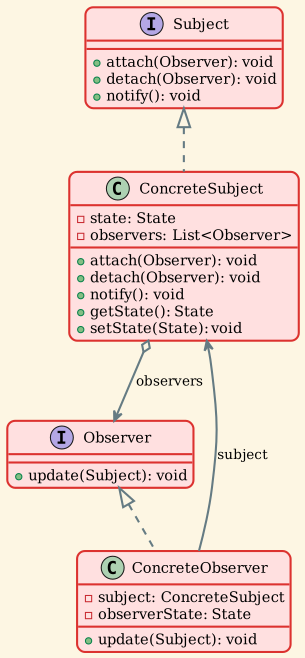
Components
-
Subject (Observable)
- Maintains a list of observers
- Provides methods to attach and detach observers
- Notifies observers of state changes
-
Observer (Listener)
- Defines an interface for objects that should be notified of changes
- Declares the update method
-
ConcreteSubject
- Stores state of interest to ConcreteObserver objects
- Sends notifications to observers when state changes
- Provides methods to get/set state
-
ConcreteObserver
- Maintains a reference to a ConcreteSubject object
- Stores state that should stay consistent with the subject's
- Implements the Observer update interface
Implementation Examples
Example 1: Weather Station
A weather monitoring system where multiple displays observe weather data changes.
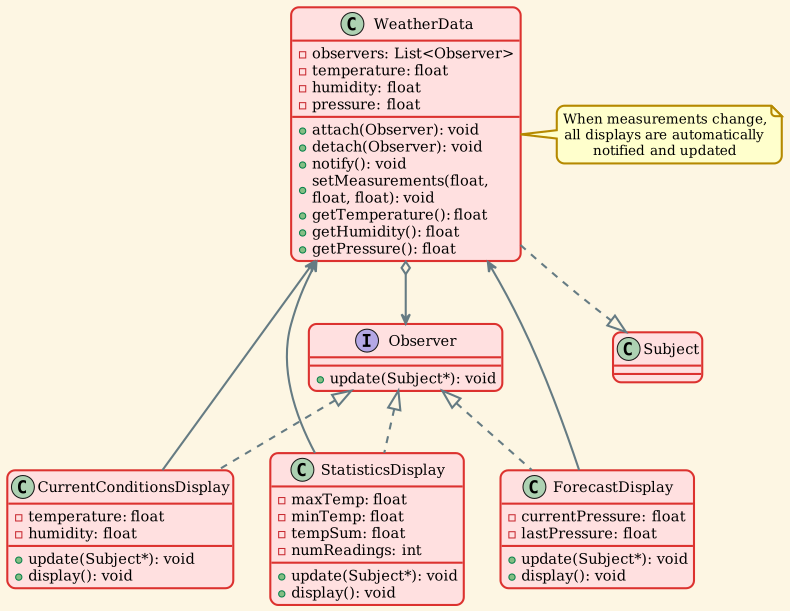
Usage:
Example 2: Stock Market
Stock prices notify multiple investors when they change.
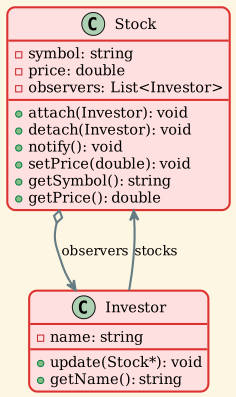
Usage:
Example 3: Event-Driven System
Generic event manager with multiple listener types.
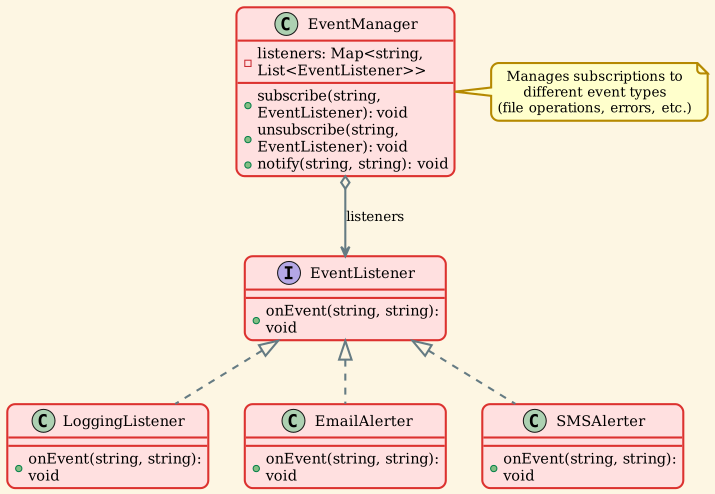
Usage:
Example 4: Push vs Pull Model
Push Model: Subject sends specific data to observers
Pull Model: Observers query subject for needed data
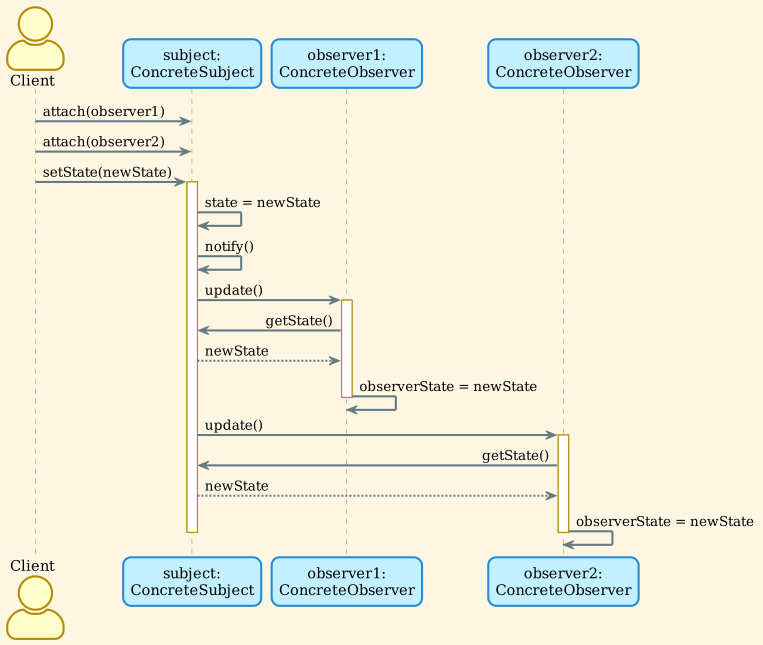
Sequence Diagram
Real-World Applications
1. GUI Event Handling
Multiple UI components observe user interactions:
2. Model-View-Controller (MVC)
The Model notifies Views when data changes:
All views automatically update when the model changes.
3. Social Media Notifications
4. Stock Market Systems
5. RSS/News Feeds
6. Logging Systems
7. Pub/Sub Messaging
Modern message brokers like Kafka, RabbitMQ:
Design Considerations
Advantages
Loose Coupling: Subject and observers are loosely coupled. Subject knows only that observers implement the Observer interface.
Open/Closed Principle: You can introduce new observer classes without changing the subject's code.
Dynamic Relationships: You can establish relationships between objects at runtime.
Broadcast Communication: Subject doesn't need to know who or how many observers there are.
Reusability: Observers can be reused with different subjects.
Disadvantages
Unexpected Updates: Observers don't know about each other and may trigger cascading updates.
Memory Leaks: If observers don't unsubscribe, they can cause memory leaks.
Performance Overhead: Notifying many observers can be expensive.
Undefined Update Order: The order in which observers are notified is typically undefined.
Debugging Complexity: Tracking updates through multiple observers can be difficult.
Push vs Pull Trade-offs
Push Model: - Less coupling (observers don't query subject) - Simpler observer implementation - Subject must know what data observers need - Less flexible (all observers get same data)
Pull Model: - More flexible (observers get only what they need) - Subject doesn't need to know observer requirements - More coupling (observers must know subject interface) - More complex observer implementation
When to Use
Use Observer Pattern when:
- One object's state change requires changing other objects
- You don't know how many objects need to be changed
- An object should be able to notify other objects without making assumptions about who they are
- You need to decouple abstraction from its implementation
Avoid Observer Pattern when:
- You have simple one-to-one relationships
- Performance is critical and you have many observers
- Observers have complex dependencies on each other
- The cost of maintaining the observer list outweighs the benefits
Best Practices
- Prevent Memory Leaks: Use weak pointers or ensure observers properly unsubscribe
- Thread Safety: Protect observer list in multi-threaded environments
- Avoid Cascading Updates: Prevent observers from modifying the subject during notification
- Document Notification Order: If order matters, document it clearly
- Consider Event Filtering: Allow observers to filter which events they receive
Related Patterns
- Mediator: Defines a centralized communication hub, while Observer distributes communication
- Singleton: Subjects are often implemented as singletons
- Command: Can use Observer to notify about command execution
- Chain of Responsibility: Can be combined with Observer for event handling
Summary
The Observer pattern lets a subject notify registered observers when state changes. Manage observer lifetimes, thread safety, and callbacks that trigger further updates.